When most people picture a hacker breaking into an account, they imagine someone at a keyboard typing password after password at a single login screen until one finally works. It makes for good television. It is also, in many real-world situations, the wrong picture.
Modern attackers are patient, organized and economical. They know that locking out an account after a handful of wrong guesses is a standard defense, and they know that most people pick predictable passwords. So instead of hammering one account with thousands of guesses, they try one or two very common passwords against thousands of accounts. They stay under the radar, and they only need a small percentage of people to have chosen something weak.
That approach is called a password spraying attack, and it is one of the most effective ways attackers get into organizations today. Its better-known cousin, the brute force attack, works in the opposite direction. In this guide you will learn the difference between them, exactly how hackers guess passwords in each case, how they relate to credential stuffing and dictionary attacks, real incidents that show the damage, and the practical defenses that stop them.
What Is the Difference Between Brute Force and Password Spraying?
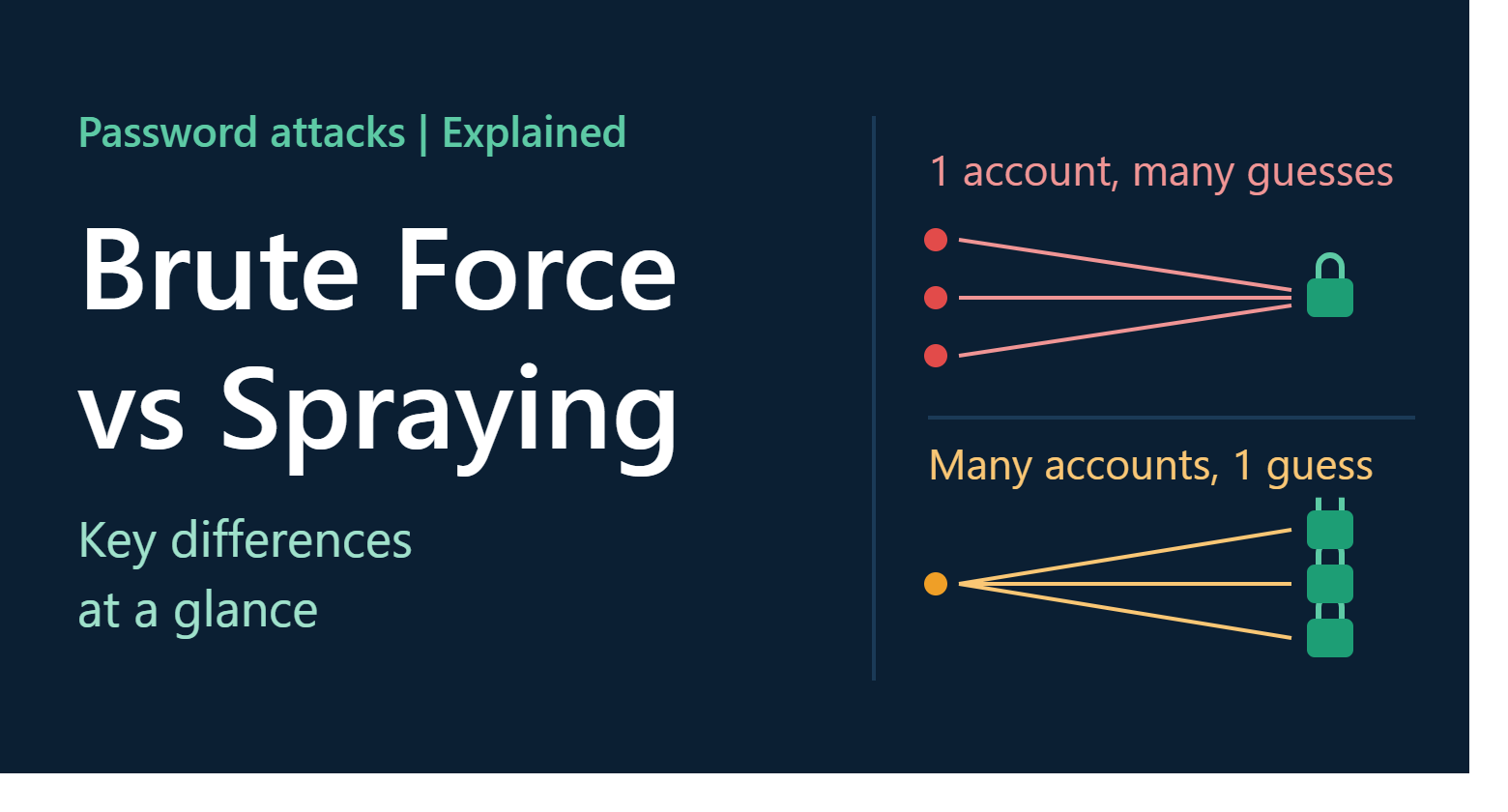
A brute force attack tries many different passwords against one account (or one encrypted password file) until it finds the right one. A password spraying attack tries a few common passwords against many accounts, spreading attempts out so that no single account gets locked out.
In short:
- Brute force: one target, many guesses
- Password spraying: many targets, few guesses each
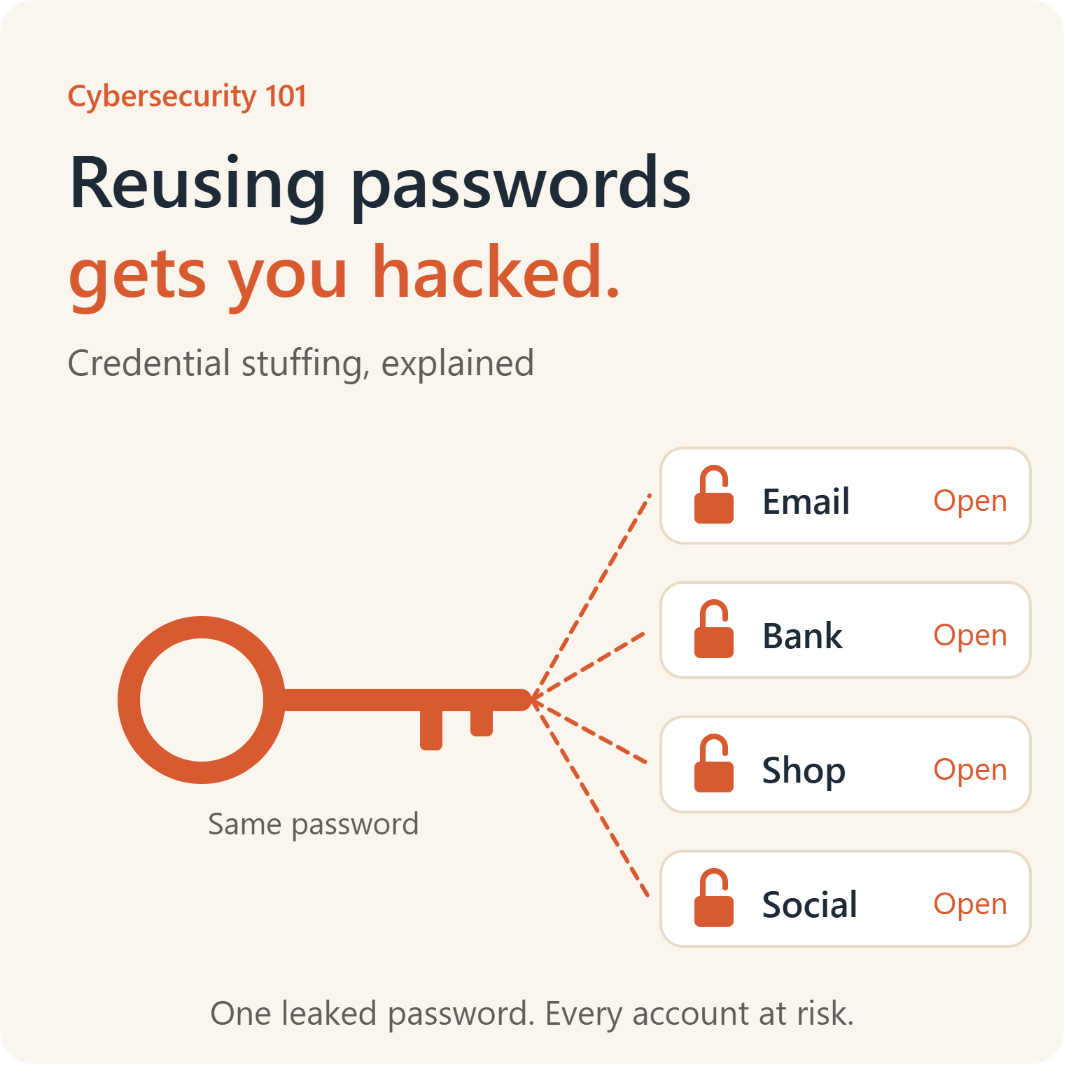
- Credential stuffing: many targets, using real leaked username and password pairs
The best defenses against all three are multi-factor authentication (MFA), long and unique passwords, blocking common passwords, rate limiting with smart lockout and monitoring for suspicious login patterns.
Key Takeaways
- Both attacks exploit weak, predictable or reused passwords, not flaws in software.
- Brute force is loud: it generates many failures on one account and is easy to detect and block when the attacker must guess online.
- Password spraying is quiet: it spreads attempts across many accounts and is designed to avoid lockouts.
- Attackers often get lists of valid usernames from email address patterns, company websites and public data.
- MFA stops the overwhelming majority of these attacks, even when the password is guessed correctly.
- A password manager, long passphrases and a ban on common passwords make guessing impractical.
How Passwords Get Guessed
A password is a secret that proves you are who you say you are. If an attacker can guess that secret, they can walk through the front door. They do not need to find a bug, trick anyone or install malware.
Guessing works because people are predictable. Large studies of leaked password databases show the same patterns again and again:
- Simple sequences such as “123456” and “qwerty”
- The word “password” and slight variations
- Names, pet names, sports teams and favorite bands
- Seasons and years, such as “Summer2026” or “Winter2025!”
- A company name followed by a number, such as “Acme123”
- Default or temporary passwords that were never changed, such as “Welcome1” or “ChangeMe”
- Keyboard patterns, such as “1qaz2wsx”
- A familiar word with predictable substitutions, such as “P@ssw0rd”
Even if only one person in a hundred uses one of the top few passwords, an attacker who tries those passwords against ten thousand accounts will get roughly a hundred successes. That arithmetic is the entire basis of password spraying.
What Is a Brute Force Attack?
A brute force attack is an attempt to find a password, key or secret by systematically trying possible values until the correct one is found. The term comes from the idea of using raw computing power, rather than cleverness, to win.
How it works
- Choose a target: a specific account, a login page, a protected file or a database of password hashes.
- Generate guesses: the attacker uses software to produce candidate passwords. In a pure brute force approach, this means every possible combination of characters of a given length, starting with the shortest.
- Test each guess: the software submits guesses to the login page or checks them against stolen data.
- Succeed or continue: when a guess matches, the attacker has the password.
The number of possible passwords grows explosively with length and character variety. A password of four lowercase letters has fewer than half a million possibilities. A password of twelve random characters from a large character set has an astronomical number. This is why length is the most important quality of a password.
Why brute force is often impractical online
When the attacker must send each guess to a live website, several obstacles appear:
- Account lockouts after a limited number of failures
- Rate limiting that slows or blocks rapid attempts
- CAPTCHAs and challenge pages
- Alerts and monitoring that flag repeated failures
- Network speed limits, since each attempt requires a round trip
As a result, pure online brute force against a well-defended login with a strong password is very slow and noisy.
Why it is dangerous offline
The picture changes if an attacker obtains a copy of the stored password data, for example after a database breach. Websites should not store passwords in plain text. They store hashes, which are one-way scrambled versions of the passwords. If an attacker steals the hashes, they can try guesses on their own hardware, with no lockouts, no rate limits and no one watching. This is called an offline attack, and the speed depends on the hashing method.
- Against fast, outdated hash algorithms, modern graphics cards can test billions of guesses per second.
- Against deliberately slow, modern algorithms designed for passwords, such as bcrypt, scrypt or Argon2, the same hardware manages far fewer guesses, which makes cracking strong passwords impractical.
The lesson is twofold. Users need long, unique passwords, and organizations need to store them with strong, slow, salted hashing.
Common variants of brute force
- Simple (exhaustive) brute force: tries every possible combination
- Dictionary attack: tries words from a list of likely passwords, names and phrases
- Hybrid attack: combines a dictionary with common modifications, such as adding numbers, capital letters and symbols, or replacing letters with look-alike characters
- Rule-based attacks: apply typical human habits, such as capitalizing the first letter and adding “1” or “!” at the end
- Reverse brute force: starts with a known password, often a common or leaked one, and searches for accounts that use it, which overlaps with password spraying
What Is a Password Spraying Attack?
A password spraying attack flips the brute force model. Instead of trying many passwords against one account, the attacker tries a small number of very common passwords against a large number of accounts. Imagine spraying a fine mist across a wide area rather than pouring a bucket of water on one spot.
How it works
- Collect usernames. The attacker builds a list of valid or likely usernames, such as email addresses. They can come from corporate websites, social media, professional networking sites, press releases, previous data breaches, and predictable formats like first.last@company.com.
- Choose a few likely passwords. They pick passwords that many people use, such as seasonal passwords, the company name with a year, default passwords or entries from lists of the most common passwords.
- Try one password across all accounts. The attacker tries the first password against every account on the list.
- Wait. They pause long enough to avoid triggering lockout thresholds. This may be minutes or hours.
- Try the next password. The cycle repeats, often spread over days or weeks and sent from many different IP addresses to resemble normal traffic.
- Harvest successes. Any account that accepts a guess is compromised.
Why attackers like it
- It avoids account lockouts. Each account sees only one or two failed attempts, which look like ordinary typos.
- It is cheap and simple. It needs no powerful hardware, only a username list and a short password list.
- It scales. Organizations with thousands of employees offer thousands of chances, and someone is likely to be using a weak password.
- It targets the weakest link. Attackers do not need the CEO’s account. Any account, including an old, forgotten or low-privilege one, can be a foothold.
- It exploits gaps in security. Legacy authentication protocols, test accounts, service accounts and single-factor logins on internet-facing systems are all tempting.
- It is hard to spot. Because the traffic is low and spread out, simple per-account monitoring may never notice.
What attackers do after getting in
A compromised account is a starting point. From there, attackers may:
- Read email and look for sensitive information or invoices
- Search for passwords, files and internal documents
- Set up inbox rules to hide their activity
- Impersonate the user to launch phishing or payment fraud
- Look for more access, including privileged accounts and cloud services
- Install malware or ransomware
- Steal data
- Register new devices or MFA methods to maintain access
Typical targets
Password spraying is aimed at any internet-facing login, including:
- Email and productivity platforms such as cloud email and collaboration suites
- Single sign-on portals and identity providers
- VPN and remote access gateways
- Remote desktop and web-based management interfaces
- Cloud services and software-as-a-service applications
- Legacy protocols such as older email protocols that do not support MFA
- Customer-facing accounts, such as retail, banking and loyalty sites
Brute Force vs Password Spraying: Side by Side
Approach
- Brute force: many passwords against one account or one set of hashes
- Password spraying: a few passwords against many accounts
Starting information
- Brute force: a single username, or a stolen file of password hashes
- Password spraying: a long list of valid or likely usernames
Speed and volume
- Brute force: very fast against stolen hashes, slow and noisy against live logins
- Password spraying: slow and quiet by design, spread over hours or days
Typical detection
- Brute force: many failed logins on one account, which triggers lockouts and alerts
- Password spraying: a few failures on each of many accounts, often from many addresses
What it relies on
- Brute force: raw computing power and short or simple passwords
- Password spraying: widespread use of common or default passwords
Main defenses
- Brute force: long passwords, strong hashing, lockouts and rate limiting
- Password spraying: MFA, banned password lists, cross-account detection and disabling legacy authentication
Where it hurts most
- Brute force: stolen password databases and poorly protected single accounts
- Password spraying: organizations with many users and internet-facing logins
Related Attacks: Dictionary, Credential Stuffing and More
These terms are often mixed up, and attackers frequently combine them.
Dictionary attack
A dictionary attack uses a list of likely passwords instead of trying every combination. It is a type of brute force that relies on human predictability. It can be used against one account or many.
Credential stuffing
Credential stuffing uses real username and password pairs leaked from other breaches and tries them on other sites, hoping that people reused their passwords. The difference from password spraying is that credential stuffing does not guess. It uses known pairs, whereas spraying guesses common passwords. Credential stuffing depends on reuse, while spraying depends on weakness.
Password cracking
This refers to recovering passwords from stolen hashes offline. It often combines dictionary, hybrid and brute force methods.
Pass-the-hash and token theft
These techniques skip guessing altogether. An attacker who has stolen a password hash or a session token may be able to authenticate without knowing the password. They are a separate threat, but they illustrate why defenders cannot rely on password strength alone.
Phishing
Why guess a password when you can trick someone into typing it into a fake page? Phishing is often easier than guessing and is the most common route to stolen credentials, which is why MFA and awareness training matter alongside password hygiene.
Online vs Offline Attacks
Online attacks go through the live login system of a website or service. They are constrained by lockouts, rate limits, monitoring and network speed. Password spraying is overwhelmingly an online attack, designed specifically to work within those constraints.
Offline attacks happen on the attacker’s own machines using stolen data, typically password hashes. They are not constrained by the target’s defenses, so speed depends on the attacker’s hardware and the hashing method. Brute force and dictionary attacks are most dangerous in this form.
Understanding the difference clarifies where to focus your protection. Online defenses protect against spraying and live brute force. Strong password storage and unique, long passwords protect against offline cracking after a breach.
Real-World Incidents
These examples come from public reporting, government advisories and company statements.
Iranian state-linked campaign against universities (2018)
In 2018, the U.S. Department of Justice announced charges against individuals associated with an Iranian organization known as the Mabna Institute. The indictment described a large campaign that compromised accounts at hundreds of universities and many companies and government bodies worldwide, stealing academic data and intellectual property. Prosecutors said the attackers used password spraying to gain access to accounts at universities, and then used the access to steal research and papers.
Citrix (2019)
In 2019, Citrix disclosed that it had been breached and said the FBI had told it that the attackers likely used password spraying, a technique in which a limited number of weak passwords are tried against many accounts, to gain a foothold and then worked to circumvent additional security layers. The case showed that a technology company with significant resources can be exposed by a few weak passwords.
Government warnings (2019 onward)
Several government agencies, including the U.S. National Security Agency, the Cybersecurity and Infrastructure Security Agency and the UK’s National Cyber Security Centre, have published advisories on password spraying and brute force techniques, noting that they are used by many threat actors, including state-sponsored groups, and recommending MFA, strong authentication practices and monitoring.
Microsoft and Midnight Blizzard (2024)
In January 2024, Microsoft disclosed that a Russia-linked group it tracks as Midnight Blizzard had gained access to some corporate email accounts. Microsoft stated that the attackers used a password spray attack to compromise a legacy, non-production test account that did not have multi-factor authentication enabled, and then used its permissions to access a small percentage of corporate email accounts, including those of some senior leaders and security staff. The incident is a vivid illustration of how a single forgotten test account without MFA can become the entry point, even at a company with some of the strongest security resources in the world.
Large-scale brute force campaigns against remote access
Security vendors and government agencies have repeatedly reported waves of automated brute force and password spraying attempts against VPNs, firewalls, remote desktop services and other edge devices, using vast pools of rotating IP addresses. These campaigns often target devices exposed to the internet with default or weak credentials.
What these cases teach
- Weak passwords and missing MFA are the common thread.
- Forgotten, test, service and legacy accounts are prime targets.
- Even sophisticated attackers use simple methods when they work.
- A single low-privilege account can lead to bigger breaches.
- Detection requires looking across accounts, not just at each one.
How to Detect Brute Force and Password Spraying
Detection depends on watching patterns across your whole environment.
Signs of brute force
- A large number of failed logins against a single account in a short time
- Repeated lockouts of one user
- Login attempts from unfamiliar locations followed by a success
- Sudden spikes in failed authentication events on a particular server or service
Signs of password spraying
- Failed logins spread across many accounts from the same IP address, network range or small set of addresses
- The same small set of passwords appearing across many attempts, where logs record that information safely
- A pattern of one or two failures per account, perhaps repeated at regular intervals
- Attempts against accounts in alphabetical or list order
- A burst of failures followed by a few successes from unfamiliar locations
- Logins from unusual geographies, hosting providers or anonymizing networks shortly after failures
- Failed attempts against non-existent usernames, which suggest the attacker is guessing the naming convention
- Increased failures on legacy authentication endpoints
- Successful logins followed by unusual activity, such as new inbox rules, mail forwarding, MFA method changes or large downloads
What to monitor
- Authentication logs from identity providers, VPNs, email systems and web applications
- Failed and successful sign-in events, correlated by source address, user agent and time
- Alerts for impossible travel and unusual sign-in locations
- Account lockout trends across the organization
- Changes to MFA registrations and mailbox rules
Security information and event management (SIEM) tools and identity protection services can automate much of this. Even small organizations can benefit from the sign-in reports built into their email or identity platform.
How to Defend Against These Attacks: For Individuals
Good personal habits shut down most guessing attacks.
1. Use long, unique passwords for every account
Length beats complexity. A passphrase of four or more random words, such as a string of unrelated words you can picture, is both strong and memorable. Every account should have a different password, so that a leak or a successful guess on one does not expose the others.
2. Use a password manager
A password manager generates and stores long random passwords so that you do not have to remember them. You protect it with one strong passphrase and MFA.
3. Turn on multi-factor authentication
MFA requires something beyond the password, such as an authenticator app code, a hardware security key or a passkey. Even if an attacker guesses your password, they cannot log in without the second factor. Prefer authenticator apps, security keys or passkeys over text messages.
4. Avoid predictable patterns
Do not use names, birthdays, favorite teams, seasons with years or common substitutions. Do not add a number to the end of an old password and call it new.
5. Change default passwords immediately
Routers, cameras, printers and smart devices often come with default credentials that are publicly known. Change them as soon as you set the device up.
6. Check for breaches
Use a breach notification service or your password manager’s breach alerts to learn whether your email appears in a known leak, and change affected passwords promptly.
7. Pay attention to login alerts
If you receive a notification of a sign-in or a lockout that you did not trigger, treat it as a signal. Change the password and review your account security.
8. Consider passkeys
Passkeys replace passwords with cryptographic credentials tied to your device and the specific website, so there is nothing to guess or spray. Use them where services offer them.
How to Defend Against These Attacks: For Organizations
Organizations should assume that someone, somewhere, is trying common passwords against their accounts right now.
1. Enforce MFA everywhere, especially on internet-facing systems
This is the single most effective control. Require MFA for email, VPN, remote access, cloud applications, administrator accounts, and also for service, test and legacy accounts wherever possible. Prefer phishing-resistant methods such as passkeys and hardware security keys.
2. Disable legacy authentication
Older protocols that cannot support MFA, such as some older email and remote access methods, are favorite spraying targets. Turn them off or block them with conditional access policies.
3. Block weak and common passwords
Maintain a banned password list that includes common passwords, variations of your company name and seasonal patterns, and screen new passwords against lists of known breached passwords. Current guidance from standards bodies such as NIST favors checking against breached and common passwords over complex composition rules and forced periodic changes.
4. Encourage length and passphrases
Set a sensible minimum length, and allow long passphrases and password manager use. Avoid rules that push people toward predictable substitutions.
5. Use smart lockout and rate limiting
Simple lockouts can be abused to lock out legitimate users, and spraying is designed to avoid them. Use adaptive or smart lockout that distinguishes between familiar and unfamiliar sources, apply rate limiting per IP address and per account, and use progressive delays and challenge pages for suspicious behavior.
6. Detect across accounts
Create detection rules that look for many accounts failing from one source, many sources failing against the same set of accounts and common failed-login patterns over longer time windows. Low-and-slow attacks require long-horizon analysis.
7. Use conditional access and risk-based authentication
Require stronger verification for sign-ins from unfamiliar locations, unmanaged devices, anonymizing networks or risky sources. Block sign-ins from countries where you have no business.
8. Reduce the attack surface
- Do not expose management interfaces and remote desktop directly to the internet
- Put remote access behind a VPN or zero trust gateway with MFA
- Remove or secure unused, test and dormant accounts, and review them regularly
- Rotate and protect service account credentials, and use long, random secrets
- Change all default credentials on devices and applications
9. Hide usernames
Avoid login pages and error messages that reveal whether a username exists. Use generic messages such as “incorrect username or password.” Be aware that attackers can still guess common naming formats.
10. Store passwords properly
Hash passwords with modern, slow, salted algorithms such as Argon2, bcrypt or scrypt, never plain text or fast general-purpose hashes. This limits the damage of an offline brute force attack after a breach.
11. Add bot and abuse protections for customer-facing sites
Use bot detection, device fingerprinting, CAPTCHA challenges where appropriate and IP reputation services to curb automated attempts.
12. Train employees
Explain why predictable passwords are dangerous, how MFA works, and how to report suspicious login prompts. Make password managers available.
13. Monitor, log and respond
Centralize authentication logs, keep them long enough to reveal slow attacks, and have a clear plan for responding to suspected compromises, including resetting credentials, revoking sessions and checking for persistence.
What to Do If You Suspect an Attack
If you are an individual
- Change your password on the affected account immediately, using a new, unique password.
- Turn on MFA, and review recovery options.
- Sign out of all sessions and remove unknown devices.
- Check for changes to your email forwarding rules, recovery information and connected apps.
- Change passwords on any account that shared the same password.
- Review recent activity for signs of unauthorized access, and monitor financial accounts.
- Run a security scan on your device if you suspect malware.
If you are an organization
- Confirm and scope the activity. Identify the source addresses, targeted accounts and any successful logins.
- Reset credentials and revoke sessions and tokens for compromised accounts, and require MFA re-registration where needed.
- Block malicious sources, while recognizing that attackers rotate addresses.
- Check for post-compromise activity: mailbox rules, forwarding, new MFA methods, OAuth app consents, data access and lateral movement.
- Close the gap: enable MFA, disable legacy authentication, deploy password protection and tune detection.
- Notify affected users, leadership and, where required, regulators and law enforcement.
- Review lessons learned and update policies.
Frequently Asked Questions
What is a password spraying attack in simple terms?
It is when an attacker tries a handful of very common passwords against many different accounts, rather than trying many passwords on one account. This helps them avoid lockouts and exploit the fact that some people always choose weak passwords.
What is the difference between brute force and password spraying?
Brute force focuses on one account and tries many passwords. Password spraying focuses on many accounts and tries few passwords. Brute force is noisy and gets locked out easily online, while spraying is quiet and designed to evade lockouts.
Is password spraying the same as credential stuffing?
No. Password spraying guesses common passwords. Credential stuffing uses real username and password pairs stolen from other breaches, relying on password reuse. Both are used against many accounts, and both are stopped by MFA and unique passwords.
How do hackers guess passwords?
They use lists of common passwords, patterns based on human habits, information gathered about the target, leaked passwords from earlier breaches and automated tools that test many combinations. If they have stolen password hashes, they can try guesses offline at very high speed.
How long does it take to brute force a password?
It depends on length, complexity and how the password is protected. Short, simple passwords can fall in seconds or minutes when attackers have stolen fast hashes. Long, random passwords, especially protected with modern hashing, can take longer than anyone could realistically spend. Length matters most.
Will account lockout stop these attacks?
Lockouts help against brute force on a single account, but password spraying is designed to stay under lockout thresholds, and lockout rules can be abused to deny service to real users. Use lockouts together with MFA, smart lockout, rate limiting and cross-account detection.
Does MFA really stop password spraying?
It stops the vast majority of successful attacks, because a correct guess is not enough to log in. Attackers may still try to bypass weaker MFA through phishing or prompt fatigue, so use phishing-resistant methods where possible and watch for unusual MFA prompts.
What are the most common passwords attackers try?
Sequences such as “123456,” the word “password,” keyboard patterns, names, and season-and-year combinations such as “Summer2026.” Default and temporary passwords that were never changed are also frequent targets.
Are small businesses at risk of password spraying?
Yes. Attackers use automation and do not care about company size. A small organization with weak passwords, exposed email and no MFA is an easy target.
Can password spraying be detected?
Yes, but you must look across accounts and over time. Watch for many accounts with a few failures each from the same source, unusual logins from unfamiliar locations, and failed attempts against legacy protocols.
Are passkeys immune to brute force and spraying?
Passkeys do not rely on a secret that can be guessed, so these attacks do not apply in the same way. They are one of the strongest options available, although account recovery processes must also be secure.
Is it illegal to try to guess someone’s password?
Yes. Attempting to access accounts without authorization is illegal in most countries under computer misuse and fraud laws. Authorized security testing with written permission is a legitimate professional activity.
Conclusion
Brute force and password spraying are two sides of the same simple idea: if people choose predictable passwords, attackers can guess their way in. What differs is the strategy. Brute force goes deep on one target, while password spraying goes wide across many, deliberately staying quiet.
Because both depend on weak passwords, the cure is largely the same. Give every account a long, unique password. Let a password manager remember it. Add multi-factor authentication, ideally with passkeys or security keys. For organizations, add banned password lists, smart lockout, legacy authentication blocks and monitoring that watches the whole environment, not just single accounts.
The forgotten test account, the default password on a router and the “Summer2026!” that someone chose in a hurry are exactly what attackers are looking for. Close those doors, and the guessing game stops being worth playing.