You did nothing wrong today. You did not click a suspicious link, you did not download a strange file and you did not give your password to a stranger. Yet your streaming account has been taken over, someone has ordered food on your delivery app, and your loyalty points have vanished.
The likely culprit is a website you barely remember. Years ago you signed up for a small forum, a fitness app or a one-time online store using your email address and the password you use almost everywhere. That site was breached. Your details ended up in a file traded among criminals. And now automated software is trying that same email and password combination on hundreds of other websites, including the ones you actually care about.
This is credential stuffing, and it is the reason password reuse risk is one of the most serious everyday threats to your online life. In this guide you will learn how a credential stuffing attack works, why it succeeds so often, real incidents that show the damage, how to tell whether you are exposed and exactly how to protect yourself and your organization.
What Is Credential Stuffing?
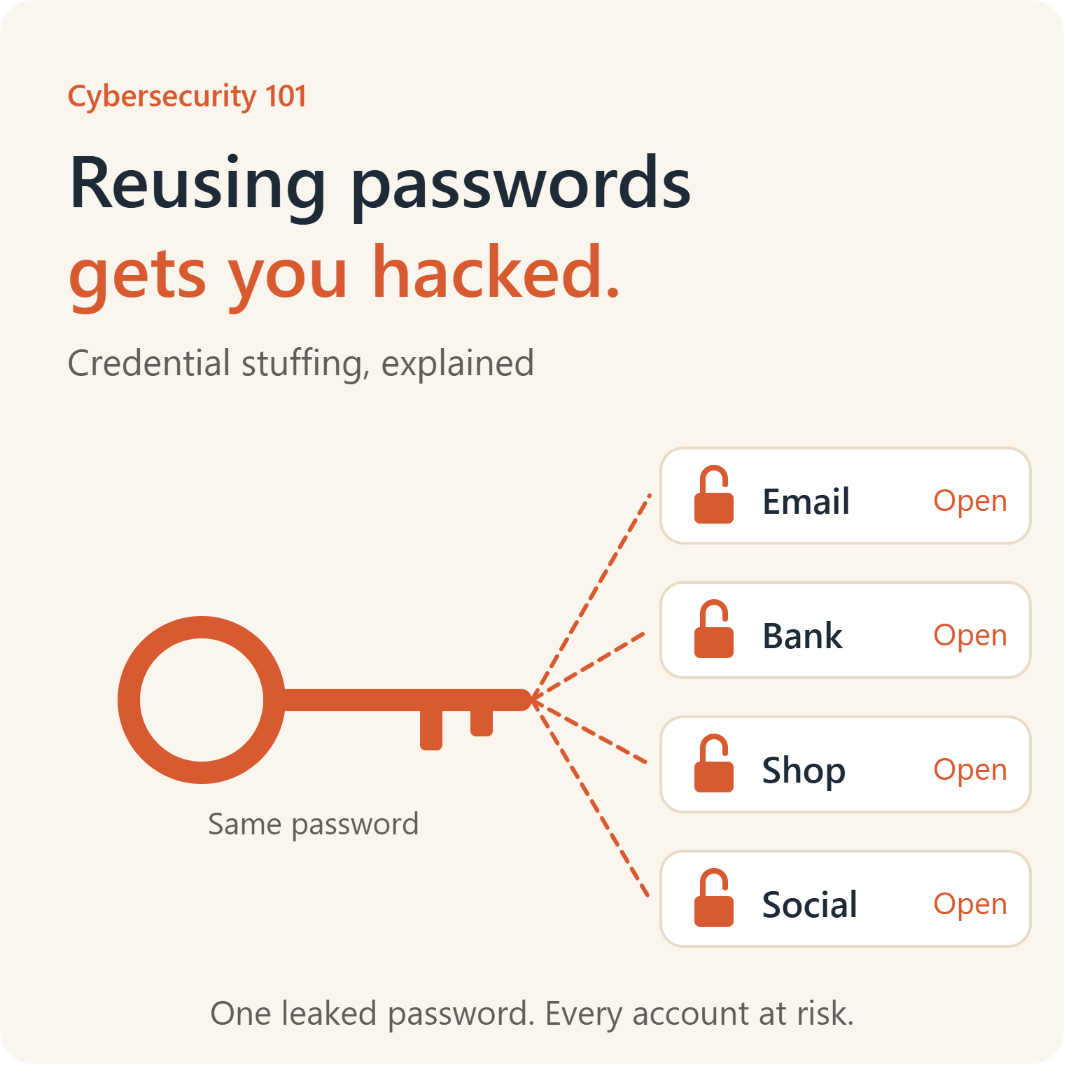
Credential stuffing is an automated cyberattack in which criminals take usernames and passwords stolen in one data breach and try them, at massive scale, on other websites and services. Because many people reuse the same password across multiple accounts, a certain percentage of attempts succeed, giving attackers access to accounts without having to guess or crack anything.
The best protection is to use a unique, strong password for every account, stored in a password manager, and to turn on multi-factor authentication (MFA) or passkeys wherever possible. Check whether your email appears in known breaches, and change reused passwords immediately.
Key Takeaways
- Credential stuffing does not hack your account. It logs in with a password that you already gave away elsewhere.
- The attack depends on password reuse. If every password is unique, a leak on one site cannot unlock another.
- It is fully automated, which means attackers can test millions of combinations cheaply and quickly.
- Even a very low success rate is profitable when billions of leaked credentials are available.
- A password manager plus MFA stops nearly all credential stuffing against your personal accounts.
- Businesses need bot detection, rate limiting, breached-password checks and MFA to protect customers.
What Is Credential Stuffing?
A “credential” is simply a login: an email address or username paired with a password. “Stuffing” describes the way attackers pour huge lists of those pairs into login forms, one after another, hoping some will fit.
The key insight is that attackers do not need to be clever. They do not need to guess passwords or find a flaw in the website they are attacking. They already have working passwords from somewhere else. All they need is for you to have reused one.
Credential stuffing is attractive to criminals for several reasons:
- The raw material is abundant. Billions of leaked credentials from past breaches circulate in criminal markets, forums and messaging channels, and some are free.
- The tools are cheap and easy. Automation software, proxy services and ready-made configurations for specific websites are sold to anyone, including people with little technical skill.
- It is hard to detect. Each login attempt looks like a normal user with a real username and password, and attackers spread attempts across thousands of IP addresses.
- The payoff is real. Stolen accounts can be used for fraud, sold, drained of stored value or used as a stepping stone into more valuable accounts.
How a Credential Stuffing Attack Works
A typical attack follows a predictable sequence.
Step 1: Obtain leaked credentials
Attackers gather credentials from data breaches, infostealer malware logs, phishing kits and leak sites. They merge them into huge files called combo lists, which are simply lines of email and password pairs. Combo lists are traded, sold and recycled for years, so a breach from a decade ago can still unlock accounts today.
Step 2: Choose targets
The criminals pick websites that hold something valuable: banking and payment apps, retail and loyalty programs, streaming services, gaming platforms, travel and airline accounts, food delivery, cloud storage, email and corporate login portals.
Step 3: Automate the login attempts
They load the combo list into automation software configured for the target’s login page. The software submits the credentials, reads the response and records which ones worked. Some tools can solve basic CAPTCHAs, mimic browsers and rotate through residential proxy networks to look like ordinary customers from many locations.
Step 4: Collect the successes
A small percentage of attempts succeed. Even a hit rate of well under one percent is lucrative when millions of attempts can be made in a short time. The successful logins are called “hits.”
Step 5: Monetize the accounts
The attackers then:
- Drain value: transfer stored balances, loyalty points, gift cards or gaming items
- Commit fraud: make purchases, order goods to a new address or take out credit
- Sell the accounts in bulk on criminal marketplaces
- Harvest personal data such as addresses, phone numbers and payment details for identity theft
- Pivot into more valuable accounts, for example by using a hijacked email account to reset other passwords
- Send spam or phishing from the compromised account to the victim’s contacts
Step 6: Repeat
The process runs continuously. Attackers refresh their lists, adjust their tools to evade defenses and move on to the next target.
Why Password Reuse Is So Dangerous
The average person has dozens, often more than a hundred, online accounts. Remembering that many unique passwords is unrealistic without help, so people take shortcuts: the same password everywhere, a favorite password with a number added at the end, or small variations such as swapping a letter for a symbol. Surveys by security companies and researchers consistently find that a large share of people reuse passwords across sites.
The risk comes from a simple fact: your security is only as strong as the weakest site that stores your password. You cannot control how well a small forum protects its user database. If it stores passwords poorly, or is hacked despite doing its best, the damage extends to every account that shares the same login.
Consider a chain of consequences:
- You use the same email and password for a pizza app, an online shop and your email account.
- The pizza app is breached and your credentials leak.
- Attackers test them on thousands of services and find they work on your online shop and your email.
- With access to your email, they can use “forgot password” links to reset almost everything else you own online.
A single weak link has become a skeleton key.
Small variations do not save you
Changing “Summer2024!” to “Summer2025!” or “Summer2024#” provides little protection. Attackers know common patterns, and many tools automatically try predictable variations of leaked passwords. A password that is related to one that has leaked should be considered compromised.
Strong but reused is still weak
A long, complicated password is excellent against guessing. It is useless against credential stuffing if it has leaked. What matters is not just the strength of a password, but whether it is unique.
Old breaches stay dangerous
Credentials do not expire in criminal markets. A password leaked in 2016 may still work today if you never changed it. That is why even people who have never heard of a recent breach can be victims.
Credential Stuffing vs. Brute Force vs. Password Spraying
These attacks are often confused. They are related but different.
Brute force tries many password guesses against a single account, for example every combination of characters, or common words, until one works. It is noisy and easy to block with lockouts.
Password spraying takes the opposite approach. The attacker tries a few very common passwords, such as “Password1” or “Welcome2026”, against many accounts. By staying under the lockout threshold for each account, it avoids detection. It relies on weak passwords.
Credential stuffing does not guess at all. It uses real, previously leaked username and password pairs and tests them on other services. It relies on reuse, not weakness.
The difference matters for defense. Account lockouts help against brute force, but credential stuffing may use each pair only once or twice, so lockouts may never trigger. Defenders therefore need bot detection, MFA and breached-password checks as well.
Real-World Credential Stuffing Incidents
Credential stuffing has affected consumer brands, entertainment companies, retailers and genetic testing services. These incidents are based on public reporting and company statements.
23andMe (2023)
In October 2023, the genetic testing company 23andMe disclosed that attackers had accessed user accounts. The company said the intrusion resulted from credential stuffing, in which login details exposed in other breaches were reused on 23andMe. Roughly 14,000 accounts were accessed directly. Because of a feature that lets users share information with relatives, the attackers were also able to view data from several million additional users who had opted into that sharing. The company later faced lawsuits and a settlement.
The case shows how one weak password can expose not only your own information but that of your family connections.
Roku (2024)
The streaming platform Roku announced in 2024 that credential stuffing attacks had compromised accounts. A first incident affected roughly 15,000 accounts, and a second, disclosed shortly afterward, affected more than 500,000 accounts. Roku said the credentials had not been taken from its own systems but came from other sources, and it forced password resets and turned on two-step verification for all accounts. In a small number of cases, attackers made unauthorized purchases.
Disney+ (2019)
Soon after Disney+ launched in late 2019, many subscribers reported being locked out of accounts, with passwords changed and accounts offered for sale online. Disney said it had found no breach of its systems, and security researchers pointed to credential stuffing using passwords reused from other services.
The Collection #1 data dump (2019)
In January 2019, security researcher Troy Hunt, who runs the Have I Been Pwned service, reported a huge collection of leaked credentials known as Collection #1. It contained hundreds of millions of unique email addresses and many millions of unique passwords gathered from earlier breaches. Collections like this are the fuel for credential stuffing, because they are already organized and ready to load into automation tools.
Retailers, restaurants and financial services
Many well-known companies, including fast-food chains, retailers, banks and online brokerages, have disclosed credential stuffing incidents over the years. The pattern is nearly always the same: the company was not hacked in the traditional sense, customers’ reused passwords were.
What these cases teach
- The victim company can be secure and the attack still succeeds, because the weak point is customer password habits.
- Entertainment, shopping and loyalty accounts are valuable to criminals, even though they may feel unimportant to users.
- Detection often comes only when customers complain.
- Strong responses involve forced resets, MFA and monitoring for automated login traffic.
How to Tell If You Have Been Affected
You may be exposed even if you have noticed nothing. Look for these warning signs, and then check for exposure.
Warning signs of account takeover
- Login alerts or password reset emails you did not request
- Being unexpectedly logged out, or unable to sign in with your normal password
- Changed email address, phone number, shipping address or profile details
- Purchases, orders, bookings or points redeemed that you did not make
- Unfamiliar devices or locations in your account’s login history
- Messages sent from your accounts that you did not write
- Friends reporting strange messages from you
- Credit card or bank notifications for charges you do not recognize
Check whether your email or password has leaked
- Search your email address at Have I Been Pwned (haveibeenpwned.com), a free service that lists known breaches affecting an address, and sign up for notifications.
- Use the breach monitoring built into your password manager or browser. Many alert you to reused, weak or compromised passwords.
- Review your reused passwords. Password managers can flag any password that appears on more than one account.
- Check old accounts. Search your inbox for welcome emails from services you forgot you joined, and delete accounts you no longer use.
If your email appears in a breach, assume the password you used on that service is public. If you used it anywhere else, change it there too.
How to Protect Yourself From Credential Stuffing
The good news is that credential stuffing is one of the most preventable attacks. A few habits stop nearly all of it.
1. Use a unique password for every account
This is the single most important defense. If every account has its own password, a leak from one site is useless against the others. You cannot remember dozens of unique passwords, and you should not try. That is what a password manager is for.
2. Use a password manager
A reputable password manager creates long, random passwords, stores them securely and fills them in for you. You remember only one strong master passphrase. Most also provide:
- Alerts for reused or weak passwords
- Notifications about known breaches
- Secure sharing for families and teams
- Autofill only on genuine sites, which helps defeat fake login pages
Avoid saving passwords in unsecured notes, spreadsheets or paper lying around your desk. Your browser’s built-in manager is better than reuse, though a dedicated tool often provides more features.
3. Create a strong master password
Protect your password manager with a long passphrase, such as four or more unrelated words, that you have never used anywhere else. Add MFA to the manager itself.
4. Turn on multi-factor authentication
MFA requires a second proof of identity in addition to your password. Even if criminals have your correct password, they cannot log in without the second factor. From strongest to weakest:
- Passkeys and hardware security keys, which resist phishing and cannot be stolen in a breach in the way passwords can
- Authenticator apps, which generate time-based codes
- Text message codes, which are better than nothing but vulnerable to SIM swapping and interception
Turn on MFA first for email, banking, payment services, cloud storage, shopping accounts with saved cards and social media.
5. Consider passkeys
Passkeys replace passwords with cryptographic keys stored on your device and unlocked with a fingerprint, face scan or PIN. There is no password to leak or reuse, and they only work on the genuine site. Where a service offers passkeys, they are an excellent upgrade.
6. Protect your email account above all
Your primary email account is the master key to your digital life, because password reset links go there. Give it a unique password, the strongest MFA available and regular security checkups.
7. Change compromised passwords promptly
If a service notifies you of a breach, or a tool flags your password as exposed, change it immediately. Change it on every other site where you used it, starting with the most important ones.
8. Delete accounts you no longer use
Every dormant account is a liability. Close old accounts, unsubscribe from services you have abandoned and remove stored payment cards you do not need.
9. Use a different email address for low-value sign-ups
Separate addresses, or email aliases, for newsletters, shopping and throwaway services reduce the damage from breaches and make it easier to identify which service leaked your data.
10. Watch for phishing
Credential stuffing uses already leaked passwords, but phishing is another source of new leaks. Do not enter your login on a site reached through an unexpected email or text. Go to the site directly.
11. Review account activity and recovery settings
Periodically check recent logins, connected devices and recovery email addresses and phone numbers. Remove devices you do not recognize.
12. Monitor your finances
Turn on alerts for card transactions and bank logins. Consider a credit freeze if personal information was exposed.
What About Changing Passwords Regularly?
For years, organizations forced employees to change passwords every 60 or 90 days. Current guidance from standards bodies such as the U.S. National Institute of Standards and Technology (NIST) recommends against forced periodic changes without evidence of compromise, because people respond by choosing weaker, predictable variations. The better approach is to use long, unique passwords, check them against lists of known breached passwords and change them whenever there is a sign of exposure.
How Businesses Can Stop Credential Stuffing
If you run a website, app or online service, credential stuffing is a major threat to your customers and your reputation, even if your own systems are never breached. Layered defenses work best, because no single control stops determined attackers.
Detect and block automated traffic
- Bot detection and management that analyzes behavior, device fingerprints, browser signals and traffic patterns, not just IP addresses
- Rate limiting by IP address, device, account and network range, applied carefully so it does not block legitimate users
- CAPTCHA or other challenges for suspicious sessions, recognizing that modern attackers and solver services can defeat basic CAPTCHAs
- Web application firewall rules tuned for abnormal login volume, user agents and request patterns
Strengthen authentication
- Offer and encourage MFA, and require it for sensitive accounts and actions
- Support passkeys and phishing-resistant authentication
- Screen passwords against breached-password lists at registration and password change, and ideally at login
- Enforce sensible password rules, with length requirements and no composition rules that encourage predictable patterns
- Use risk-based authentication, which asks for extra verification when a login comes from a new device, location or suspicious network
Protect accounts and detect abuse
- Monitor login failure rates and success rates for sudden spikes. Credential stuffing often shows as a surge of failed logins from many sources or an unusually low success rate on high volumes
- Alert users to new device logins, password changes and changes to email addresses and payment details
- Require re-authentication for high-risk actions such as changing contact details, adding payees or redeeming stored value
- Add friction to account recovery so attackers cannot simply reset their way in
- Forward-looking intelligence: subscribe to breach notification and credential monitoring services that alert you when your customers’ credentials appear in leaks
Respond quickly
- Force password resets on affected accounts and invalidate active sessions
- Notify customers clearly and promptly, and tell them how to protect themselves
- Follow legal requirements for breach notification, which vary by country and region
- Review and improve controls after every incident
Do not rely on a single measure
Account lockout alone is not enough, because credential stuffing spreads attempts thinly. IP blocking alone is not enough, because attackers use huge proxy networks. MFA is the most powerful control, but should be combined with bot defenses so attackers cannot even test credentials freely.
For employers: protect corporate logins
Employees reuse passwords between personal and work accounts. Attackers know this and test leaked personal credentials against corporate portals, VPNs and cloud services. Protect your organization by enforcing MFA on every external-facing system, using single sign-on, screening employee passwords against breach lists, monitoring for leaked company email addresses and training staff on password hygiene.
What to Do If Your Account Was Taken Over
If you suspect a credential stuffing attack has succeeded, act quickly and calmly.
- Try to sign in and change the password. Use a new, unique password. If you cannot log in, use the account recovery process.
- Contact the service’s support if you are locked out. Report the takeover and ask them to secure the account.
- Turn on MFA immediately once you regain control.
- Sign out of all sessions and devices, and remove unfamiliar devices and connected apps.
- Check and fix account details such as email, phone number, shipping address and payment methods.
- Change passwords everywhere you used the same one, starting with email, banking and shopping accounts.
- Secure your email account first if it may have been exposed, because it controls all password resets.
- Review financial statements and report unauthorized charges to your bank or card issuer right away.
- Report fraud. In the United States, you can report identity theft at identitytheft.gov. Other countries have equivalent national agencies.
- Consider a credit freeze or fraud alert if sensitive personal details may have been exposed.
- Warn your contacts if the attacker sent messages from your account.
- Scan your devices for malware. If the original password was taken by an infostealer rather than a website breach, resetting passwords on an infected device will not help.
Frequently Asked Questions
What is credential stuffing in simple terms?
It is when criminals take email and password pairs leaked from one website and automatically try them on many other websites. If you used the same password in both places, they get into your account.
Is credential stuffing the same as hacking?
Not in the usual sense. The attacker is not breaking into a system or guessing your password. They are logging in with a real password that already leaked. That is why it often goes unnoticed until the damage is done.
How do attackers get the passwords?
Mostly from earlier data breaches, infostealer malware, phishing campaigns and leaked databases. These are collected into huge lists and traded or sold online.
Does using a strong password protect me?
Only if it is also unique. A strong password reused on several sites is still vulnerable once one of those sites leaks it.
Does changing my password slightly help?
Very little. Attackers use tools that test common variations, such as adding a number or changing a letter. Use completely different, randomly generated passwords for each account.
Will multi-factor authentication stop credential stuffing?
It stops almost all of it, because the attacker has the password but not the second factor. Phishing-resistant MFA, such as passkeys and hardware keys, is the strongest option. Even SMS codes provide a substantial improvement over a password alone.
Are password managers safe?
Reputable password managers encrypt your data and are much safer than reusing passwords or storing them in plain text. Like any account, protect yours with a strong master passphrase and MFA. The risk of a rare vendor incident is far lower than the everyday risk of reuse.
How can I tell if my password has been leaked?
Search your email address on Have I Been Pwned, and use the breach alerts in your password manager or browser. If a service you use announces a breach, change that password and any others that match.
Why do attackers target things like streaming and food delivery accounts?
Because they are easy to resell, often lack MFA and may hold stored payment details or loyalty value. Criminals test the same passwords everywhere, and these services tend to be profitable.
How can companies detect credential stuffing?
By monitoring for spikes in failed logins, unusual login volumes from many IP addresses, low success rates on high traffic, logins from unexpected devices and patterns typical of bots. Dedicated bot management tools and breached-password screening help.
Is credential stuffing illegal?
Yes. Accessing accounts without authorization violates computer misuse and fraud laws in most countries, whether the passwords were guessed, stolen or reused.
Conclusion
Credential stuffing succeeds because of a simple human habit: we reuse what we can remember. Attackers do not need to outsmart you. They only need an old breach, a cheap tool and a little patience.
The fix is equally simple, even if it takes a few hours to set up. Use a password manager so that every account has its own unique password. Turn on multi-factor authentication or passkeys for the accounts that matter. Check whether your email has appeared in a breach, and change anything that is reused or exposed. Close accounts you no longer need.
Do those things, and a leak on some forgotten website will stay a problem for that website, not for you.