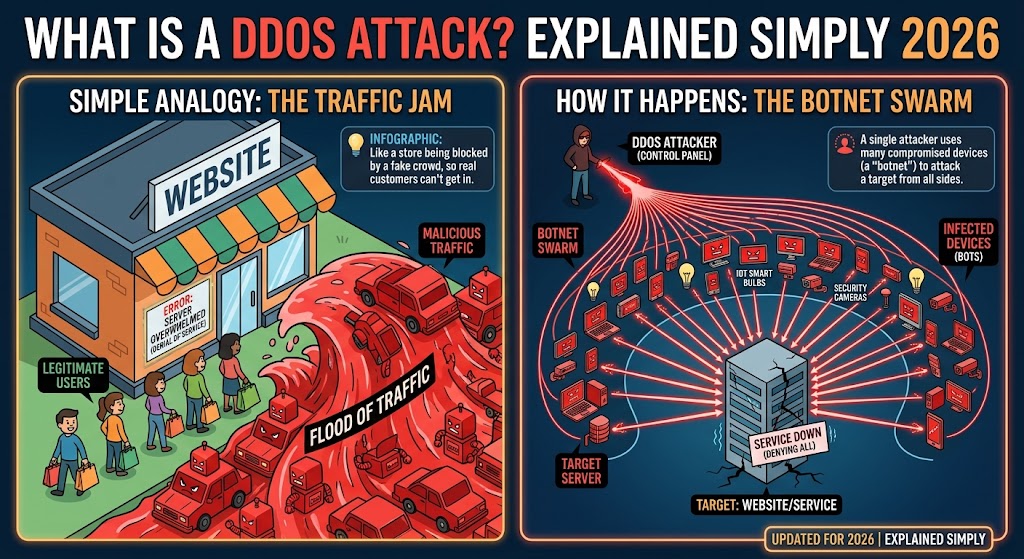
Imagine you own a small shop on a busy street. One morning, you unlock the door and find thousands of people crowded outside. They are not buying anything. They are not even looking at your products. They simply stand there, shoulder to shoulder, blocking the entrance. Your real customers cannot get in. Your staff cannot get out. The shop is open, the lights are on, the shelves are full, and yet you are completely out of business for the day.
That, in essence, is a DDoS attack. Instead of a crowd of people, the attacker uses a crowd of computers. Instead of a shop, the target is a website, an online game, a bank, a government portal or any other service connected to the internet. And instead of an hour of disruption, a serious attack can last days and cost millions.
In this guide you will learn what a DDoS attack is, the DDoS meaning behind the acronym, how DDoS works from start to finish, the main types, famous real-world examples, the warning signs, who is at risk and how individuals and organizations can defend themselves.
What Does DDoS Mean?
Let us break down the acronym.
Denial of Service (DoS) means preventing legitimate users from accessing a service. If a website cannot respond to visitors because it is overloaded, the service has been “denied.”
Distributed means that the attack comes from many different computers, in many different places, at the same time, rather than from a single machine.
Put together, DDoS meaning is a denial-of-service attack launched from a large number of distributed sources. The distribution is what makes it powerful and difficult to stop. If a single computer sends too much traffic, you can simply block its address. If tens of thousands of computers around the world do so at once, blocking them one by one is not feasible.
A simple analogy
Think of a restaurant that can seat 100 people and take 100 phone calls an hour.
- A DoS attack is like one person calling the restaurant over and over, tying up the phone line. The restaurant can identify the caller and block the number.
- A DDoS attack is like 50,000 people calling simultaneously from different phones. The line is jammed, real customers cannot book a table and the restaurant cannot easily tell which calls are fake.
Nothing was stolen and no one broke in, but the business is effectively shut down.
How a DDoS Attack Works
Every online service has limits: how much data its network connection can carry, how many requests its servers can process each second, how many connections it can keep open and how much memory and processing power it has. A DDoS attack tries to exceed one or more of those limits.
Step 1: Build or rent an army
The attacker needs many devices to send traffic. They either build a botnet by infecting devices with malware, or rent access to an existing botnet or a “booter” or “stresser” service sold on criminal markets.
Step 2: Choose a target and a method
The attacker selects a target, such as a website’s address or an online game server, and decides what kind of traffic to send. Some attacks aim to fill the network connection. Others aim to exhaust the server’s resources or overwhelm a specific application.
Step 3: Launch the flood
The attacker commands the botnet to start. Thousands or millions of devices begin sending requests, data packets or connection attempts to the target at once.
Step 4: The target is overwhelmed
The target’s network connection fills up, or its servers spend all their effort responding to fake requests, leaving no capacity for real visitors. Pages load slowly or not at all, apps time out and services go offline.
Step 5: Maintain, switch or escalate
Attackers may keep the flood running for minutes, hours or days. They often change tactics mid-attack to evade defenses, combining several types of traffic at once, which is known as a multi-vector attack.
Step 6: The aftermath
When the attack stops, or is mitigated, the target may need to restore systems and assess damage. Meanwhile customers may have lost access, revenue and trust.
Botnets: Where the Attack Traffic Comes From
A botnet is a collection of internet-connected devices that have been infected with malware and are controlled remotely, usually without their owners knowing. Each infected device is called a bot or zombie. The criminal operating the network is the botmaster, and issues commands through a control server.
What devices become bots?
- Home and office computers with weak security or out-of-date software
- Internet of Things (IoT) devices: security cameras, baby monitors, smart TVs, digital video recorders, doorbells and smart plugs, often shipped with default passwords that owners never change
- Home routers and modems with weak passwords or unpatched flaws
- Servers and cloud instances that have been compromised
- Smartphones infected with malicious apps
Why IoT devices are so attractive
Many connected gadgets are built cheaply, with little attention to security. They often run all day, have decent internet connections, rarely receive updates and have no screen or alert that would tell the owner they are infected. A botnet of a million cameras and routers can generate enormous traffic.
How owners may notice
Usually they do not. Possible clues include sluggish internet, a device that is unusually hot or slow, unexpected network traffic or a router that behaves strangely. Many victims discover that their device was part of an attack only after their internet provider contacts them.
Booter and stresser services
Some criminals do not build botnets themselves. They run websites that sell DDoS attacks as a service, sometimes for a few dollars. Customers, often teenagers or gamers, pay to knock a rival offline. These services are illegal, even when they advertise themselves as “stress testing” tools, and law enforcement agencies have repeatedly seized them and prosecuted operators and customers.
The Main Types of DDoS Attacks
Security professionals usually group DDoS attacks into three categories, based on which part of the connection they target.
1. Volumetric attacks (flooding the pipe)
These attacks aim to consume all the available bandwidth between the target and the internet. Think of a water pipe: if you force far more water in than it can carry, nothing useful gets through. Volumetric attacks are measured in bits per second (bps), often gigabits (Gbps) or terabits (Tbps) per second.
Common techniques include:
- UDP floods, which send huge numbers of simple data packets to random ports
- ICMP (ping) floods, which send overwhelming numbers of echo requests
- Amplification and reflection attacks, in which the attacker sends small requests to third-party servers, such as misconfigured DNS, NTP or memcached servers, while forging the victim’s address as the source. Those servers then send much larger responses to the victim. A small request can generate a response tens or thousands of times bigger, which multiplies the attacker’s power
2. Protocol attacks (exhausting server resources)
These target the way network protocols work, consuming the processing capacity of servers, firewalls and load balancers rather than just bandwidth. They are measured in packets per second (pps).
Common techniques include:
- SYN floods, which start many connection requests but never complete them, leaving the server waiting and its connection table full
- Fragmented packet attacks, which send malformed or fragmented data that is costly to process
- Ping-of-death style attacks, which send malformed packets intended to crash systems, mostly blocked by modern software
3. Application-layer attacks (mimicking real users)
These are the most subtle. They target specific applications, such as a website’s login page, search function or checkout, by sending requests that look legitimate. They are measured in requests per second (rps). Because each request appears normal, they can be harder to distinguish from genuine traffic, and relatively small volumes can cause damage.
Common techniques include:
- HTTP floods, which repeatedly request pages or submit forms, often choosing expensive operations such as database searches
- Slow attacks such as Slowloris, which open connections and keep them open by sending data extremely slowly, tying up the server’s connection capacity
- API abuse, which hammers application programming interfaces
- DNS query floods, which overwhelm domain name servers, causing sites that depend on them to become unreachable
Multi-vector and carpet-bombing attacks
Modern attackers frequently combine methods, for example a volumetric flood to distract defenders while an application-layer attack goes after the website. In carpet-bombing attacks, the traffic is spread across many addresses in a network range, keeping each individual stream below detection thresholds while still overwhelming the whole network.
Ransom DDoS
In this variation, criminals send a threat demanding payment, usually in cryptocurrency, and often back it up with a short demonstration attack. The message warns of larger attacks if the victim does not pay. Authorities generally advise against paying, because it encourages repeat targeting and does not guarantee that the attack will stop.
Why Attackers Launch DDoS Attacks
DDoS attacks are about disruption, and the reasons vary.
- Extortion: demanding payment to stop or to avoid an attack, often timed for peak business periods
- Hacktivism: protest against a government, company or cause, with attackers hoping for publicity
- Competition and sabotage: taking down a rival’s website during a sale or event
- Gaming and personal grievances: knocking opponents offline in online games, or retaliating against streamers and players
- Smokescreen: distracting security teams while another attack, such as a data breach or fraud, takes place
- State-linked or geopolitical motives: targeting government, media or critical infrastructure during conflicts
- Vandalism and boasting: showing off skills or causing chaos
- Testing and criminal demonstration: proving the power of a botnet to potential customers
Famous DDoS Attacks
These incidents come from public reporting and company statements.
Estonia (2007)
In spring 2007, Estonia’s government, banks, media and other websites were hit by waves of DDoS traffic during a political dispute. It disrupted online services in one of the world’s most digitally connected countries and is often cited as an early example of cyberattacks used in a geopolitical conflict.
Spamhaus (2013)
The anti-spam organization Spamhaus was hit by a large DDoS attack that used DNS amplification and reached roughly 300 Gbps, which at the time was among the largest ever seen. The attack also caused congestion on parts of the wider internet and was widely reported.
Dyn and the Mirai botnet (2016)
In October 2016, a massive attack on the DNS provider Dyn disrupted access to well-known websites and services, including major social media, streaming and e-commerce platforms, for many users, especially in North America and Europe. The attack was carried out using the Mirai botnet, built from hundreds of thousands of compromised IoT devices such as cameras and routers with default passwords. The source code of Mirai was later released publicly, inspiring many variants, and its creators were prosecuted in the United States.
GitHub (2018)
In February 2018, the code hosting platform GitHub was hit by an attack peaking at around 1.35 terabits per second using memcached amplification. GitHub’s use of a DDoS mitigation provider allowed it to recover within minutes. At the time, it was a record, and it showed how amplification can turn small requests into enormous floods.
Amazon Web Services (2020)
Amazon reported in 2020 that its AWS Shield service had mitigated a record-setting attack that peaked at about 2.3 terabits per second.
HTTP/2 “Rapid Reset” (2023)
In 2023, Google, Cloudflare and Amazon disclosed a new technique that exploited a feature of the HTTP/2 protocol to generate record-breaking application-layer attacks, with peaks reported at hundreds of millions of requests per second. The case showed that attackers continue to find new weaknesses in widely used protocols, and that vendors coordinate patches and defenses.
Record-breaking volumes in recent years
Cloud security providers have reported a steady escalation in attack size. Cloudflare, for instance, has publicly reported mitigating attacks well beyond five terabits per second in recent years, with later records going higher still. The trend is clear: attack capacity keeps growing as botnets expand and as attackers harness powerful servers and cheap, fast connections.
What these cases teach
- Even large, well-run organizations can be targeted.
- Insecure everyday devices can power huge attacks.
- Third-party dependencies matter, as the Dyn attack showed. An attack on a DNS provider affected many companies that were not themselves targeted.
- Preparation and professional mitigation make the difference between a brief blip and a prolonged outage.
Warning Signs of a DDoS Attack
A sudden surge in visitors can be good news, such as a viral post or a successful promotion. Distinguishing legitimate spikes from attacks is part of defense. Look for patterns such as:
- A website or app becomes extremely slow or unavailable, with no change on your side
- Unusual traffic spikes, especially at odd hours, with no matching marketing event
- A flood of requests from a single IP address, a small group or a narrow range, or from a single country or region you do not usually serve
- Lots of requests to a single page or endpoint, such as the login page, search or checkout
- Strange traffic patterns, such as identical requests, unusual user-agent strings, or visits that never load images or scripts
- Network equipment overloaded: routers, firewalls or load balancers at maximum capacity
- Server resources maxed out, with high CPU, memory or connection counts
- Connectivity problems on the whole network, not just one site, such as slow internet for everyone in the office
- Errors from your hosting or internet provider, or a notice that they have blocked or rate-limited your traffic
- Spikes in failed connections or incomplete requests
- A ransom or threat message arriving by email shortly before the disruption
DDoS vs. DoS vs. Hacking
These terms are often mixed up.
DoS (denial of service) is an attack from a single source. It is easier to stop, because the source can be blocked.
DDoS uses many sources, making it harder to block and capable of far larger scale.
Hacking or a data breach involves breaking into systems to steal, change or destroy data. A DDoS attack, on its own, usually does not penetrate the target’s systems or steal information. It simply makes them unavailable.
That said, the two can be related. Attackers sometimes use a DDoS attack to distract defenders while they attempt a breach, and a prolonged attack can strain security monitoring. Treat any DDoS as a prompt to check that nothing else is happening.
Who Gets Targeted?
Anyone with an online presence can be targeted, but some are more at risk than others:
- E-commerce and retail sites, especially during major sales
- Banks, payment processors and financial services, where downtime is costly
- Online gaming platforms and individual players
- Media, news and entertainment companies, particularly during major events
- Government agencies and public services
- Healthcare providers and critical infrastructure
- Technology and cloud companies, including DNS, hosting and security providers
- Small businesses and nonprofits, which often lack protection and are easy targets for extortion
- Individuals, such as streamers, gamers and activists
The cost of an attack includes lost sales, lost productivity, emergency response, reputational damage, customer churn and sometimes regulatory problems. For a small online shop, a day of downtime during a peak season can be devastating.
How to Defend Against DDoS Attacks
No one can prevent attackers from trying, but you can make your service far harder to knock over. The best defenses are layered and prepared in advance.
1. Use a DDoS protection or mitigation service
This is the single most effective step for most organizations. Specialist providers operate huge networks that can absorb and filter malicious traffic before it reaches you. They offer:
- Always-on protection, which routes traffic through the provider continuously
- On-demand protection, which you activate when under attack, though it takes longer to respond
- Scrubbing centers, which separate good traffic from bad and forward only the clean traffic
Many content delivery networks, cloud providers and hosting companies include basic DDoS protection, which is often enough for small sites.
2. Put a CDN in front of your site
A content delivery network spreads your content across many servers around the world, absorbing traffic close to its source and hiding your origin server’s address. Attackers have a much harder time overwhelming a globally distributed network.
3. Hide your origin server
If attackers can find your real server’s IP address, they can bypass protective services and attack it directly. Restrict access so that your server accepts traffic only from your protection provider, and avoid exposing the real address through DNS records, email headers or old subdomains.
4. Use a web application firewall and rate limiting
A web application firewall (WAF) filters malicious requests at the application layer. Rate limiting restricts how many requests a single user or address can make in a given time. Together they blunt HTTP floods and abusive scraping.
5. Design for resilience
- Over-provision bandwidth and capacity where practical
- Use load balancers to spread traffic across multiple servers
- Use auto-scaling in the cloud, with spending limits to avoid surprise bills
- Distribute infrastructure across regions and providers
- Make DNS resilient with multiple, reputable providers, because DNS is a common point of failure
- Cache aggressively so that your servers do less work per request
- Separate critical systems so that an attack on a public website does not take down internal tools
6. Harden your network and servers
- Keep software, firmware and operating systems updated
- Close unnecessary ports and services
- Configure firewalls and routers to drop spoofed and malformed traffic
- Turn off or secure services that can be abused for amplification, such as open DNS resolvers, outdated NTP and exposed memcached
- Work with your internet service provider on filtering options
7. Monitor and know your baseline
You cannot spot an attack if you do not know what normal looks like. Monitor traffic, response times, error rates and server load, and set alerts for unusual spikes. The earlier you detect an attack, the faster you can respond.
8. Prepare a DDoS response plan
A plan written before an attack saves precious time. It should include:
- Who is in charge, and who to call, including your hosting provider, ISP and mitigation vendor
- Contact details and escalation paths, available outside office hours
- Technical steps, such as activating mitigation, adjusting rules or switching DNS
- Communication templates for customers, staff, partners and the public
- Decision rules for ransom demands, including a policy of not paying
- Legal and law enforcement contacts
- A post-incident review process
Rehearse it, so that people know their roles.
9. Do not become part of the problem
Secure your own devices so they cannot be hijacked into botnets:
- Change default passwords on routers, cameras and smart devices
- Update firmware regularly and replace devices that no longer receive updates
- Disable remote administration and unneeded services
- Use a firewall and keep your computers patched and protected
- Segment IoT devices on a separate network where possible
10. Consider insurance and contracts
Some cyber insurance policies cover business interruption from DDoS attacks. Check your hosting and service contracts for uptime guarantees, support during attacks and any extra charges for mitigation or traffic spikes.
What to Do During a DDoS Attack
If you believe you are under attack, move quickly and calmly.
- Confirm it is an attack, not a legitimate surge, a software failure or a provider outage. Check monitoring tools and traffic logs.
- Activate your response plan and assemble your team.
- Contact your hosting provider, ISP and DDoS protection vendor. They can often filter traffic upstream, where you cannot.
- Turn on or escalate mitigation, such as under-attack modes, stricter rate limits, challenge pages and geographic filters, balancing security with the risk of blocking real customers.
- Preserve evidence: logs, traffic captures, timestamps and any ransom messages. These help investigators and insurers.
- Check for other activity, such as intrusion attempts or fraud, in case the DDoS is a distraction.
- Communicate clearly with customers, staff and partners. A status page, social media updates and honest messages reduce frustration.
- Do not pay a ransom without consulting experts and law enforcement. Paying may not stop the attack and can mark you as a willing payer.
- Report the attack to law enforcement or national cybersecurity authorities. In the United States, you can report to the FBI’s Internet Crime Complaint Center (ic3.gov) and CISA.
- After the attack, review and improve: analyze what worked, close gaps and update your plan.
DDoS and Everyday Users
Most people will never experience a major DDoS attack firsthand, but individuals can be affected in two ways.
As a victim
Gamers and streamers are sometimes targeted by rivals who discover their IP address and flood their home connection. Signs include sudden lag, disconnections from games or services, and a home internet connection that stops working. If it happens:
- Restart your router to try to obtain a new IP address from your provider
- Contact your internet provider, who may be able to help or change your address
- Use a reputable VPN or a game-hosting service to hide your real IP address in the future
- Avoid sharing your IP address, and be careful with peer-to-peer connections, voice chat and links from strangers
- Report the attack to the game platform, which may ban the offenders
As an unwitting participant
Your devices could be part of a botnet without your knowledge. To prevent this, change default passwords, keep devices updated, remove or replace old unsupported gadgets, install security software on computers and phones, and be careful about what you download and click. If your internet provider warns you that your connection is sending suspicious traffic, take it seriously and check your devices.
The Legal Side
Launching a DDoS attack is a crime in most countries, usually under computer misuse, fraud or cybercrime laws, and penalties can include prison sentences and significant fines. Hiring a booter or stresser service is also illegal, even if the buyer does not understand the technology. Law enforcement agencies have repeatedly shut down such services and charged operators and customers, and the creators of the Mirai botnet were prosecuted.
If you want to test your own defenses, only use authorized, professional testing services with written permission and coordination with your hosting provider.
Frequently Asked Questions
What is a DDoS attack in simple terms?
It is an attempt to make a website or online service unusable by flooding it with so much traffic from so many sources that it cannot cope. Real users are locked out.
What does DDoS stand for?
Distributed Denial-of-Service. “Distributed” refers to the many devices used to send the traffic, and “denial of service” refers to preventing legitimate users from accessing the service.
Does a DDoS attack steal data?
Usually not. Its goal is to cause disruption. However, attackers sometimes use DDoS as a distraction while attempting something else, so organizations should check for other signs of intrusion.
How long does a DDoS attack last?
Attacks can last from a few minutes to many days. Many are short bursts designed to cause disruption or to demonstrate power, while others are sustained campaigns.
Can a DDoS attack hurt my computer or phone?
Not directly. If you are the target, your internet connection may become unusable. If your device is part of a botnet, it may slow down and use your bandwidth, and it could expose you to further compromise.
How do attackers get so many devices?
They infect devices with malware, often by exploiting weak or default passwords and unpatched software, particularly on internet-connected gadgets and routers. Some simply rent existing botnets.
Can you stop a DDoS attack completely?
You cannot stop attackers from trying, but with the right protection, most attacks can be absorbed or filtered with little or no impact. The best approach is layered defenses and a prepared response.
Can small businesses be targeted?
Yes. Small sites are often targeted for extortion, competition or simply because they are easy. Even basic protection from a CDN or hosting provider greatly reduces the risk.
Is a VPN a defense against DDoS?
For individuals, a VPN can hide your real IP address, making it harder for someone to target your home connection. It does not protect a company’s servers from a large-scale attack, which needs dedicated mitigation.
What is the difference between a DDoS attack and a traffic spike?
A legitimate spike usually has a reason, such as a news mention or sale, and consists of varied real users who browse, buy and engage. A DDoS attack tends to come from suspicious sources, hammer particular pages and show repetitive, abnormal patterns.
Should I pay a ransom if threatened with a DDoS attack?
Authorities and security experts generally advise against it. Payment may not stop the attack, and it can encourage further demands. Report the threat and contact your protection provider.
Is DDoS the same as ransomware?
No. Ransomware encrypts your files and demands payment for the key. A DDoS attack floods your service with traffic. Some criminals use both, but they are different threats.
Conclusion
A DDoS attack is the digital version of a mob blocking a shop’s doorway. It is blunt, it is noisy and it is surprisingly effective, because the internet was designed to let anyone connect to anyone. The same openness that allows a small shop to reach the whole world also allows a swarm of hijacked devices to crowd it out.
The good news is that defense has matured. Cloud-based mitigation, content delivery networks, smart architecture and a well-rehearsed plan can turn a potentially catastrophic outage into a minor event. And on a personal level, the habits that protect you, such as changing default passwords and keeping devices updated, also stop your gadgets from being drafted into someone else’s attack.
Whether you run a global platform, a small online store or just a home network full of smart devices, the principle is the same: prepare before you are targeted, know what normal looks like and have someone to call when things go wrong.