Your phone is at 4%. You are in a crowded airport terminal, your flight is delayed and your boarding pass is on the screen of a dying device. Then you see it: a free charging station with a row of glowing USB ports. Relief.
But a nagging thought arrives before you reach for your cable. You have seen the warnings. Government agencies have cautioned travelers about plugging into public USB ports. News stories describe hackers stealing data from phones as they charge. There is even a catchy name for it: juice jacking.
So is it real? Should you avoid every public charger for the rest of your life? Or is it one of those scary tech stories that is far more frightening on paper than in practice?
The honest answer sits somewhere in the middle. This guide explains what juice jacking is, how it could work, what experts and researchers have actually found, which risks are real and which are exaggerated, and the simple habits, including using a USB data blocker, that make public USB charger safety a non-issue.
Is Juice Jacking Real?
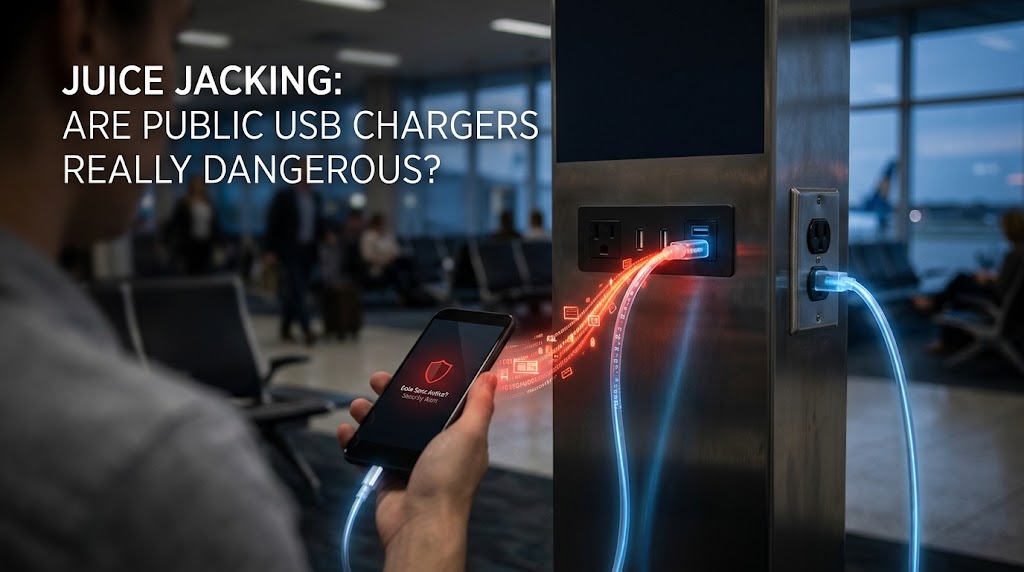
Juice jacking is a type of attack in which a malicious or compromised USB charging port or cable steals data from, or installs malware on, a device connected to it. The attack is technically possible and has been demonstrated by security researchers, but there are few or no well-documented cases of criminals using it widely in the real world. Modern phones also ask for your permission before allowing data transfer, which blocks the simplest versions of the attack.
The risk to ordinary travelers is low but not zero. The easiest protection is to use your own charger and cable plugged into a wall outlet, carry a power bank, or use a charge-only cable or USB data blocker when you must use a public port.
Key Takeaways
- USB cables carry both power and data. Juice jacking exploits the data connection.
- The term was coined in 2011 after a security conference demonstration, and the concept has been demonstrated by researchers since.
- Experts generally say real-world juice jacking is rare to unconfirmed, but there are good reasons to avoid unnecessary risk.
- Malicious cables are, in some ways, a more realistic threat than compromised charging stations.
- Your own wall adapter, a power bank or a USB data blocker removes the risk almost completely.
- Everyday threats such as phishing, weak passwords and stolen phones cause far more harm than juice jacking.
What Is Juice Jacking?
Juice jacking is a cyberattack in which a public USB charging port, a cable or a charging device has been modified to do more than deliver power. While your phone or tablet charges, the compromised port tries to:
- Steal data, such as photos, contacts, messages or files
- Install malware or spyware on the device
- Gain control of the device by pretending to be a keyboard or another trusted accessory
The name is a blend of “juice,” a slang term for battery power, and “hijacking.” It captures the idea of hijacking a device while it is drinking power from a free outlet.
The scenario is believable because we plug into public ports without thinking. Airports, hotels, cafes, conference centers, trains, rideshare vehicles and shopping malls all offer USB charging. We tend to trust them because they look official and because we are in a hurry and desperate for battery.
How USB Charging Can Expose Your Phone
To understand the risk, it helps to know what is inside a USB cable.
A standard USB cable has two jobs:
- Power: delivering electricity to charge a battery
- Data: carrying information between devices, for example when you transfer photos to a computer or connect to a car’s infotainment system
When you plug your phone into a wall adapter, the adapter provides only power. The data wires are ignored or not connected to anything. When you plug into a computer or a device that behaves like one, however, the phone can potentially exchange data with it.
A malicious charging station might be built so that behind the port sits a small computer rather than a plain power supply. That computer can attempt to talk to your phone through the data lines, in the same way a laptop would, and try to access data or exploit software weaknesses.
Why phones are not defenseless
Modern phones do not simply hand over their files when you plug them into an unknown device. They typically:
- Default to charge-only mode when connected
- Display a prompt asking whether you trust the connected device or want to allow file transfer
- Require you to unlock the device before allowing data access
- Limit what a newly connected accessory can do
These protections mean a successful attack usually needs a trick, a software flaw or user error on your part, such as tapping “Trust” or “Allow” without thinking.
The Types of Juice Jacking Attacks
Security researchers have described several ways a hostile USB connection could try to harm a device.
Data theft
The malicious port tries to access your storage or app data. On a device configured to allow file transfer, this could expose photos, documents and other files. Modern phones restrict this by default.
Malware installation
The port attempts to install a malicious app or exploit a flaw in the operating system. Early demonstrations focused on this route, and mobile operating systems have since added significant protections, including stricter trust prompts and permission requirements.
Keyboard or input emulation (HID attacks)
A malicious device can pretend to be a keyboard or mouse. Because phones and computers generally trust such devices, it can then send commands as if a person were typing, such as opening apps, changing settings or approving prompts. This type of attack has been shown against computers and, in some research, against mobile devices.
Video jacking
Some research has shown that a malicious charger or cable could capture the contents of a phone’s screen by exploiting video output features that reuse the same USB port. This would let an attacker see what is displayed, including messages and passwords.
Tracking and fingerprinting
Even a benign-looking connection could in theory record identifying information about the device, such as its model and identifiers.
Malicious cables and accessories
Instead of compromising a charging station, an attacker can hide a small computer inside a cable or adapter that looks perfectly ordinary. Researchers have built and sold such cables for security testing. A cable like this can be plugged into any outlet or left for victims to find, gifted or substituted.
Where the Term Came From, and What Researchers Have Shown
The 2011 conference demonstration
The term “juice jacking” was popularized by journalist Brian Krebs, who wrote about a charging kiosk set up at a hacker conference in 2011. The kiosk was built by security researchers to demonstrate the concept, and attendees who plugged in their phones saw a warning message explaining that they should not trust public charging stations. It was a deliberate awareness exercise, not a real attack.
Further research
Since then, researchers have repeatedly shown proof-of-concept attacks:
- In 2013, researchers at the Georgia Institute of Technology demonstrated that an iPhone could be infected within about a minute of connecting to a specially built, malicious charger, even without the user doing anything beyond plugging it in. Apple responded by improving its software protections.
- Other researchers have shown attacks that exploit Android debugging features, USB input emulation and video output.
- In recent years, security professionals have built and demonstrated malicious cables that look identical to ordinary ones but contain tiny wireless-enabled implants.
- In 2025, researchers at Graz University of Technology described a family of techniques called ChoiceJacking, in which a malicious charger pretends to be an input device and tries to tap the “allow” button on a phone’s data-access prompt by itself. The researchers reported that they could bypass protections on several phones, and manufacturers have since been working to address the weaknesses.
These demonstrations are important, because they show that the underlying idea is sound and that the protections on phones, while strong, are not perfect.
The official warnings
In recent years, several public agencies have issued advice about public charging ports. A prosecutor’s office in California warned travelers about the concept in 2019. In April 2023, the FBI’s Denver field office posted a warning about the risks of public charging stations, and the U.S. Federal Communications Commission has also published consumer advice recommending that people avoid public charging stations and use their own chargers or power banks.
These warnings are cautious and precautionary. They did not point to a wave of confirmed attacks, and some security experts criticized them for overstating a risk that had few known real-world examples.
Is Juice Jacking a Real-World Threat? What Experts Say
The fairest summary is this: juice jacking is real as a technique, but unproven as a widespread crime.
Why experts say the threat is low
- Few confirmed cases. Despite years of warnings, security researchers and journalists have struggled to identify documented cases of criminals using compromised public chargers at scale to steal data from travelers.
- Better phone defenses. Both major mobile operating systems have strengthened protections against unauthorized USB data access, requiring user approval, unlocked screens and restricted modes.
- Poor economics for attackers. Placing and maintaining hardware in public places is risky, labor-intensive and likely to be discovered, while far easier methods such as phishing, scams and stolen passwords yield much more money.
- High effort, uncertain reward. An attacker has no way to know whose phone will plug in, what model it is, or whether it is up to date.
Why experts still recommend caution
- Proof-of-concept attacks exist, and researchers continue to find new ways around phone protections.
- The cost of avoiding the risk is tiny. Carrying a power bank or using your own wall adapter takes no skill.
- Targeted attacks are plausible. A journalist, executive, activist or government employee might be worth the effort to a determined attacker, especially via a tampered cable.
- Absence of evidence is not evidence of absence. A well-run attack could go undetected.
- Users still tap “Allow.” Prompts are only useful if people read them.
In short, for most people the risk is small, but because avoiding it is easy, treating public USB ports with caution is a sensible habit.
Built-In Protections on Modern Phones
Mobile operating systems have added layers of defense, and knowing how they work helps you use them.
On iPhone and iPad
- When you connect to an unknown accessory or computer, iOS asks whether you want to “Trust This Computer” before it allows data access, and requires your passcode to confirm.
- A feature called USB Restricted Mode limits data connections if the device has been locked for an extended period.
- Lockdown Mode, an optional extreme-protection setting for people who may be targeted by sophisticated attacks, blocks wired connections to computers or accessories when the device is locked.
On Android
- When you connect to a computer or unknown device, Android generally defaults to “charging only” and shows a notification for USB preferences, where you can choose File Transfer or other modes.
- Many Android versions require the device to be unlocked before allowing data transfer.
- USB debugging, a developer feature, is turned off by default and should stay that way unless you are a developer.
- Newer versions of Android include additional protections against unauthorized USB access.
What you can do to strengthen them
- Keep your phone updated. Security patches fix the very weaknesses that researchers discover.
- Never tap “Trust” or “Allow” on a prompt unless you intentionally connected to your own computer or a known accessory.
- Keep USB debugging off.
- Use a strong passcode and keep the phone locked while charging in public.
- Consider Lockdown Mode or equivalent settings if you believe you could be targeted.
The Risk That Remains: Malicious Cables and New Bypass Research
Cables are a bigger worry than stations
A compromised kiosk in a busy airport is likely to be noticed eventually. A single cable is far easier to hide and move. Security researchers have shown that cables containing hidden electronics can look indistinguishable from legitimate ones, and can include features such as keyboard emulation and wireless connectivity.
This suggests several sensible rules:
- Do not use cables you find, are given or receive unexpectedly, such as promotional giveaways, cables left in public places or ones sent in the mail from unknown senders.
- Buy cables and chargers from reputable brands and sellers. Counterfeit products are a safety and security risk.
- Keep your own cable with you rather than borrowing a stranger’s or using the one attached to a public station.
New research on bypassing prompts
The ChoiceJacking research, mentioned above, matters because it shows that attackers can try to bypass the consent step that protects most phones. If a charger can pretend to be an input device and tap “Allow” on your behalf, the prompt alone may not save you. Manufacturers have been addressing these issues, but it underscores why the safest approach is to avoid giving untrusted ports a data connection at all.
How to Charge Safely in Public
You do not have to give up charging on the go. Here are the safest options, from most to least recommended.
1. Carry a power bank
A portable battery pack is the simplest and most reliable solution. It is independent of any public infrastructure, works anywhere and costs very little. Charge it at home before you travel.
2. Use your own wall adapter and cable in an AC outlet
Bring your own charger and plug it into a standard electrical outlet. Because a wall adapter delivers only power and no data path to any external computer, this effectively removes the juice jacking risk. Many airports, hotels and cafes have regular outlets near seating.
3. Use a charge-only cable
Some cables are built with no data wires, so they can carry power but not information. They look like normal cables, sometimes marked “charge only,” and cost little. Be sure to buy them from a reputable seller, because a fake could still contain data lines.
4. Use a USB data blocker
A USB data blocker, sometimes called a USB condom or a data-blocking adapter, is a small adapter that sits between your cable and a USB port. It physically disconnects the data pins and lets only power through. See the next section.
5. Use a car charger or vehicle outlet you control
A 12-volt adapter in your own car or a rental car you are using is typically safer than a public kiosk. Be aware that built-in USB ports in some vehicles are connected to the infotainment system, so a plug-in adapter in the cigarette-lighter socket is preferable for pure charging.
6. If you must use a public USB port
If there is no alternative, reduce the risk:
- Lock your phone, or turn it off, before plugging in. A powered-off phone is far less exposed, and a locked phone limits data access.
- Decline any prompt that asks to trust the device, transfer data or enable accessories.
- Check for tampering, such as loose ports, glued-on parts or unusual attachments.
- Avoid cables you did not bring, and prefer a port that accepts your own cable.
- Use wireless charging pads where available, although these may not be easy to find in public.
- Update your phone regularly to benefit from the latest protections.
What not to do
- Do not unlock your phone and leave it unattended on a public charger.
- Do not click “Trust” or “Allow file transfer” on a public charger.
- Do not use a charging station that looks damaged or tampered with.
- Do not plug into unfamiliar cables found lying around or offered by strangers.
- Do not ignore unexpected messages, pop-ups or behavior on your phone after charging.
What Is a USB Data Blocker?
A USB data blocker is a tiny adapter with a USB plug on one end and a USB socket on the other. When you connect it between your phone’s cable and a charging port, it passes along power but blocks the data lines. This is why it is sometimes called a “USB condom.”
Why it works
Because the data wires are not connected, there is no path for data to travel. Juice jacking relies on that data connection, so the attack cannot work through a properly built blocker.
Things to know
- Charging may be slower. Some data blockers limit charging speed because fast charging protocols use data lines to negotiate higher power. Look for models that explicitly support fast charging if that matters.
- Quality matters. Cheap, unbranded blockers may be poorly made or may not work as advertised. Choose a reputable brand with good reviews.
- It cannot fix a compromised cable. If your own cable contains a malicious implant, a data blocker placed between the cable and the port will not help. Use a trusted cable.
- It is not needed on a wall adapter. If you use your own AC adapter, you already have what a blocker would provide.
- Alternatives exist. A charge-only cable provides similar protection with fewer parts to carry.
What to Do If You Think You Were Juice Jacked
Most people who worry about this will never be affected. But if your phone behaves strangely after using a public charger, or if a prompt appeared and you tapped “Trust,” take these steps.
- Disconnect the device and turn on airplane mode while you investigate.
- Review any prompts you accepted, and check whether new accessories, profiles or device management settings appeared.
- Check for unfamiliar apps, profiles, configuration changes or accessibility permissions, and remove anything you do not recognize.
- Update the operating system to the latest version.
- Run a reputable mobile security scan, if available for your device.
- Change passwords for important accounts, such as email, banking and cloud storage, from a different, trusted device. Turn on multi-factor authentication.
- Review account activity for unfamiliar logins or changes.
- Back up important data and consider a factory reset if you see signs of compromise, such as unknown apps, rapid battery drain, overheating or unexplained data usage. Restore only from a backup made before the incident, if possible.
- Report suspicious charging stations to the venue, such as the airport or hotel, and to local authorities if you suspect deliberate tampering.
- Contact your employer’s IT or security team if the phone is used for work.
Advice for Businesses and Frequent Travelers
Organizations whose staff travel often should treat juice jacking as a low-probability risk that is cheap to eliminate.
Practical policies
- Provide employees with power banks, travel chargers and trusted cables as standard issue.
- Include public charging in security awareness training, emphasizing the “use your own charger” rule without overstating the danger.
- Enforce device management settings that block USB data transfer on company phones and laptops where appropriate.
- Disable USB debugging on managed devices and prevent users from enabling developer options.
- Keep devices updated through managed patching.
- Control accessories, and discourage employees from using unknown cables, promotional USB devices or found drives.
- Use stronger protections for high-risk staff, such as executives, journalists, legal staff or government employees, including Lockdown Mode or equivalent features and data blockers.
- Do not forget the bigger threats: phishing, public Wi-Fi risks and lost or stolen devices.
For frequent travelers
- Pack a small kit: a wall adapter, a short cable you trust, a power bank and optionally a data blocker
- Charge devices at your hotel room or a secure location before heading out
- Keep your phone locked and updated
- Be cautious about USB ports in rental cars, shared workspaces and vehicles you do not own
Putting Juice Jacking in Perspective
It is easy to focus on an exotic threat while ignoring much more common ones. If you want to protect your phone and your data, these steps do far more than avoiding a charging kiosk:
- Use a strong passcode and biometric lock, and set the phone to lock automatically
- Enable multi-factor authentication on important accounts
- Keep software updated
- Be wary of phishing emails, texts and calls, which cause vastly more losses than compromised chargers
- Avoid sensitive tasks on public Wi-Fi, or use a trusted VPN
- Install apps only from official stores
- Turn on device-finding and remote-wipe features in case the phone is lost or stolen
- Back up your data regularly
Juice jacking deserves a place on your checklist, but not at the top.
Frequently Asked Questions
What is juice jacking?
It is a cyberattack in which a compromised public USB charging port or cable tries to steal data from or install malware on a phone or other device while it charges.
Is juice jacking real?
The technique is real and has been demonstrated by researchers, but there are very few confirmed cases of criminals using it widely against ordinary travelers. The practical risk is generally considered low.
Is it safe to charge my phone at an airport?
Usually, yes, especially if you use your own wall adapter or a power bank, or take a few precautions. The simplest approach is to avoid plugging your cable directly into a public USB port and use a regular electrical outlet instead.
Can a hacker steal my data just by plugging into a public USB port?
On a modern, updated phone, it is difficult. The phone generally defaults to charging only, requires you to unlock it and asks for permission before data access. An attack would likely need a software vulnerability or a trick that gets you to approve something. Research shows that such bypasses can exist, which is why caution is still sensible.
What is a USB data blocker, and do I need one?
It is a small adapter that blocks the data pins of a USB connection, allowing only power to pass. It is useful if you often use public USB ports, but you do not need one if you always use your own wall adapter or a power bank.
Are wireless charging pads safe?
Wireless chargers deliver power without a data connection through a cable, so they avoid USB-based data attacks. As with anything, buy from reputable manufacturers.
What about charging my phone from a laptop or someone else’s computer?
This involves a real data connection, so only connect to computers you trust, and decline trust prompts on unknown ones. A charge-only cable or data blocker avoids the issue.
Are malicious cables real?
Yes. Security researchers have built and sold cables with hidden electronics for testing purposes, showing that a cable can look normal while containing a tiny computer. Buy cables from reputable sources and do not use ones you find or receive unexpectedly.
Do iPhones and Android phones have different risks?
Both have strong protections and both have been subject to proof-of-concept research. The best practices are the same: keep the device updated, decline unexpected prompts and avoid untrusted USB connections.
Should I turn off my phone when charging in public?
It is an extra precaution that reduces exposure, since an off or locked phone offers little for an attacker to work with. It is not necessary if you use your own adapter or a power bank.
Why do agencies warn about public chargers if there are few real cases?
The warnings reflect a precautionary approach. The attack is feasible, the preventive steps are simple and the potential harm, such as data theft or device compromise, would be serious for the person affected.
Does using a public USB port void my phone’s warranty or damage the battery?
Not by itself. Some low-quality chargers can deliver poor power and may stress batteries over time, which is another reason to use reputable chargers and cables.
Final Thoughts
Juice jacking sits in an interesting category: more than a myth, less than an epidemic. Security researchers have proven that a malicious charging port or cable can, under the right conditions, attack a phone. Phone makers have responded with prompts, restricted modes and other protections, and new research keeps testing their limits. Yet years after the first alarms, there is little hard evidence that criminals are using public chargers to steal from everyday travelers.
The sensible response is neither panic nor dismissal. Because the fix is so cheap and easy, it makes sense to avoid giving strangers’ ports a data connection to your phone. Bring a power bank. Use your own adapter and a wall outlet. Keep a charge-only cable or USB data blocker in your bag for emergencies. Lock your phone, update it and say no to any prompt you did not expect.
Do that, and you can stop worrying about the charging station in the airport and spend your attention on the threats that actually cause most harm: phishing, weak passwords and scams. Your battery will thank you, and so will your data.