You are sitting in an airport café, waiting for a delayed flight. Your phone shows two Wi-Fi networks with almost identical names: the café’s official network and one with a slightly different spelling. You join the one that looks right, check your email and log in to your bank to confirm a payment.
Everything works perfectly. That is exactly the problem. If the network you joined was not the café’s, everything you just did may have passed through a stranger’s laptop on its way to the internet, and you would never have noticed.
This is the idea behind a man-in-the-middle attack, often shortened to MITM attack. It is one of the oldest concepts in network security, and it remains relevant today because the internet still runs on connections between devices you cannot see or fully control. This guide explains what a man-in-the-middle attack is, how the main techniques work, how evil twin Wi-Fi networks fool people, real incidents that show the risk, and the practical habits and technical controls that prevent it.
What Is a Man-in-the-Middle Attack?
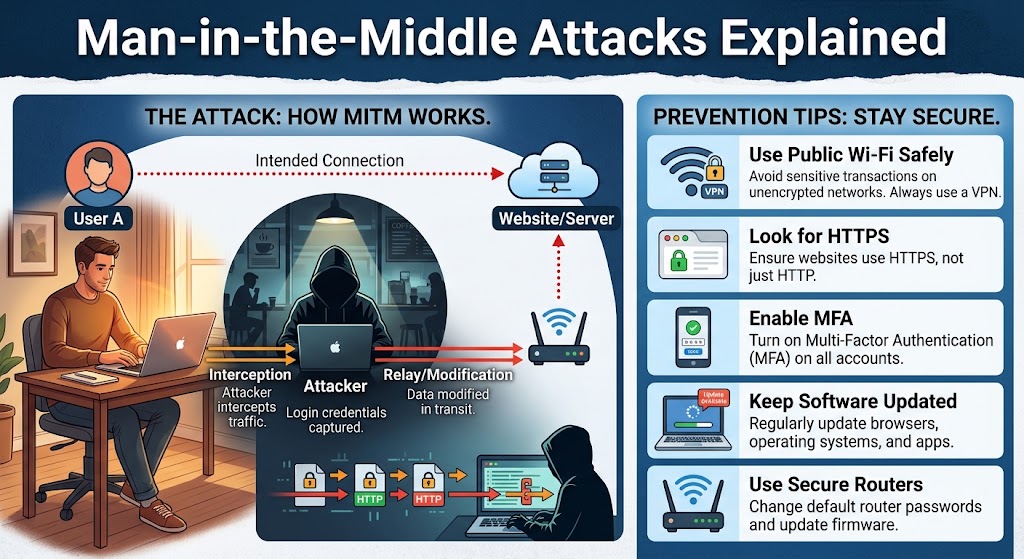
A man-in-the-middle (MITM) attack happens when an attacker secretly positions themselves between two parties who believe they are communicating directly, such as you and a website, or you and your bank. The attacker can eavesdrop on the conversation, steal passwords and data, and sometimes alter the messages passing through.
Common MITM methods include fake Wi-Fi hotspots (evil twins), ARP spoofing on local networks, DNS spoofing, SSL stripping, session hijacking and phishing proxies that capture logins. You can reduce the risk by using HTTPS everywhere, avoiding public Wi-Fi for sensitive tasks, using a trusted VPN, turning on multi-factor authentication or passkeys, and never clicking through certificate warnings.
Key Takeaways
- A MITM attack works by sitting between you and the service you are using, not by breaking into your device.
- Modern encryption (HTTPS/TLS) makes passive eavesdropping much harder, but attackers have workarounds, including fake networks, fake certificates and phishing proxies.
- Public Wi-Fi is the classic risk, but home routers, compromised devices and DNS settings can also be abused.
- Browser warnings are a defense. Treat certificate errors as real alerts, not annoyances.
- A few habits, such as using HTTPS, a VPN on untrusted networks and phishing-resistant MFA, block most real-world MITM attacks.
Whenever you use a website, app or online service, your device exchanges data with another system across a chain of networks: your Wi-Fi, your router, your internet provider and many intermediate routers. In a normal, secure exchange, the people and machines along that path can carry your data but cannot read or change it.
In a MITM attack, the criminal inserts themselves into that chain, or tricks your device into sending traffic to them directly. They then act as a relay. You think you are talking to your bank. Your bank thinks it is talking to you. In reality, both are talking to the attacker, who passes messages back and forth while reading, recording or modifying them.
The attack has two central goals:
- Interception: capturing information such as login credentials, session cookies, payment details, emails and messages
- Manipulation: altering what you see or send, for example changing a payment recipient, injecting malicious code into a web page or redirecting you to a fake site
The term is sometimes updated to adversary-in-the-middle (AiTM), particularly when describing modern phishing attacks that relay logins to bypass multi-factor authentication.
How a MITM Attack Works
Almost every MITM attack has two phases.
Phase 1: Interception
The attacker must first get into the path of your traffic. This can happen in several ways:
- Creating or controlling a network you connect to, such as a rogue Wi-Fi hotspot
- Tricking devices on the same network into sending data to the attacker’s machine
- Corrupting the directions your device uses to find websites, such as DNS records
- Compromising a router, proxy or device that already carries your traffic
- Luring you to a lookalike website that relays your actions to the genuine one
Phase 2: Decryption or exploitation
Once in the middle, the attacker faces a problem: most traffic today is encrypted with TLS, the technology behind the padlock icon and “https” in your browser. If the encryption is intact, the attacker sees only scrambled data.
So they try to defeat it, using methods such as:
- Downgrading the connection to an unencrypted version
- Presenting a fake certificate and hoping you will accept it
- Using a certificate they have tricked the device into trusting
- Relaying the real site through a phishing proxy so that your login, and the session that results, belong to them
- Stealing data before it is encrypted or after it is decrypted, for example with malware on your device
The quality of modern encryption means the weak point is rarely the mathematics. It is usually a person clicking through a warning, a misconfigured service or a device that has been tricked into trusting the wrong thing.
Types of Man-in-the-Middle Attacks
1. Rogue Wi-Fi and evil twin hotspots
The attacker sets up a wireless access point that mimics a legitimate one, using a similar or identical name, or offers a “free Wi-Fi” network that does not belong to anyone legitimate. Devices that join send their traffic through the attacker. This is the most familiar real-world MITM scenario, and it is explained in more detail below.
2. ARP spoofing (ARP poisoning)
On a local network, devices use the Address Resolution Protocol (ARP) to match IP addresses with physical hardware addresses. ARP has no built-in authentication. An attacker on the same network can send false ARP messages that make other devices believe the attacker’s machine is the router. Traffic meant for the internet then flows through the attacker first. This attack requires the attacker to be connected to the same local network, such as a shared office, hotel or café Wi-Fi.
3. DNS spoofing (DNS cache poisoning)
The Domain Name System translates names such as “yourbank.com” into numeric addresses. If an attacker can corrupt DNS responses, whether on a local network, on a compromised router or in a DNS server’s cache, victims are sent to the attacker’s server instead of the real one. The page may look identical to the original.
4. SSL stripping and downgrade attacks
When you type a website name without “https”, your browser may first try an unencrypted connection before the site redirects you to a secure one. An attacker in the middle can intercept that first request, keep talking to you over plain HTTP while speaking HTTPS to the real site, and read everything in between. Protections such as HSTS (HTTP Strict Transport Security) and HTTPS-first browser settings were designed to stop this.
5. HTTPS spoofing and fake certificates
The attacker presents a forged or fraudulently obtained certificate for a legitimate domain. If the victim’s browser or device trusts the issuer, or the user clicks through the warning, the attacker can decrypt and re-encrypt traffic. This relies on weaknesses in the certificate system or in user behavior.
6. Session hijacking (cookie theft)
After you log in, websites keep you signed in with a session token stored in a cookie. If an attacker steals that token, they can impersonate you without needing your password, and sometimes without triggering MFA. Cookies can be stolen on unsecured networks, through malware, or through cross-site scripting flaws.
7. Email hijacking
Attackers who gain access to an email account, or who intercept messages between businesses, can sit silently inside a conversation and then insert themselves at a critical moment, for example to change bank details on an invoice. This overlaps with business email compromise.
8. Adversary-in-the-middle phishing (AiTM)
In this modern variation, the attacker sends a phishing link to a convincing proxy site. When the victim enters credentials and approves an MFA prompt, the proxy relays them to the real service in real time and captures the resulting session cookie. The attacker then has a valid, authenticated session. In 2022, Microsoft reported a large-scale campaign of this type targeting more than 10,000 organizations, which shows that MFA based on codes or push notifications can be bypassed when the victim is lured to a proxy.
9. Rogue proxies, malicious browser extensions and malware
If malware changes your device’s proxy settings, installs a rogue root certificate or adds a malicious browser extension, it can read and modify traffic without needing a network position at all. This is sometimes called a man-in-the-browser attack.
10. Router and network device compromise
Home and small business routers with default passwords, outdated firmware or exposed admin pages can be taken over and set to use malicious DNS servers. Every device on the network is then exposed.
11. Bluetooth and mobile network interception
Weaknesses in short-range protocols, or fake cellular base stations that force phones onto weaker connections, have been shown by researchers to allow interception under certain conditions. These attacks are more complex and less common for everyday users than Wi-Fi and phishing-based attacks, but they are part of the landscape.
12. Internet routing attacks (BGP hijacking)
At the scale of internet providers, attackers or misconfigurations can cause traffic to be routed through the wrong networks. These incidents can redirect or intercept large volumes of traffic. Strong end-to-end encryption limits the damage.
Evil Twin Wi-Fi Explained
The evil twin Wi-Fi attack deserves special attention because it is easy to carry out and easy to fall for.
How it works
Wireless devices connect to networks by name (the SSID). They also remember networks they have joined before and will automatically reconnect to anything with the same name. An attacker can create an access point that copies the name of a well-known network, such as an airport, hotel, coffee chain or conference, and often broadcasts a stronger signal so devices prefer it. Alternatively, the attacker simply creates an open network called “Free Airport WiFi.”
When you connect, your device sends its traffic to the attacker’s hardware, which then relays it to the real internet so everything seems to work. Along the way, the attacker may:
- Capture unencrypted traffic
- Redirect you to a fake login page, called a captive portal, that asks for your email, password, phone number or even payment details in exchange for “access”
- Attempt to strip encryption or present fake certificates
- Inject malicious content or prompt fake software updates
- Record which sites you visit and when
Why it is effective
- People expect free Wi-Fi in public places and rarely verify the network name
- Many devices automatically join previously used networks
- A captive portal asking you to “sign in” feels normal
- Everything keeps working, so there is no sign anything is wrong
How to avoid evil twin networks
- Confirm the exact network name and password with staff before joining, instead of choosing the first plausible option.
- Be suspicious of open networks that ask for personal details or passwords for the “free Wi-Fi.”
- Turn off auto-join for public networks and delete saved networks you no longer use.
- Use your phone’s hotspot for sensitive tasks when you are unsure.
- Use a trusted VPN on any network you do not control, so that your traffic is encrypted before it leaves your device.
- Never ignore certificate warnings that appear after connecting to a public network.
- Disable Wi-Fi when you are not using it, so your device does not announce the names of networks it remembers.
Real-World MITM Incidents
These examples come from public reporting, security research and company statements.
DigiNotar (2011)
DigiNotar was a Dutch certificate authority, one of the organizations that browsers trust to vouch for websites. In 2011, attackers breached it and issued fraudulent certificates for many domains, including one for Google. Reports indicated the fake certificate was used to intercept the traffic of Iranian users accessing Gmail. Browser makers removed trust in DigiNotar and the company went bankrupt. The incident showed how one compromised certificate authority could enable MITM attacks at scale, and it accelerated reforms such as certificate transparency.
Superfish on Lenovo laptops (2015)
In 2015, it emerged that some Lenovo consumer laptops shipped with adware called Superfish that installed its own root certificate and intercepted encrypted web traffic to inject advertisements. Because the same private key was used across machines, security experts warned that anyone could exploit it to impersonate secure websites to affected users. Lenovo apologized and released removal tools. The case showed that a MITM position can come from software that is already on your device.
Kazakhstan’s root certificate (2019)
In 2019, researchers reported that Kazakh internet providers had attempted to force users to install a government-issued root certificate that would allow interception of encrypted traffic to many popular sites. Major browser makers responded by blocking that certificate. The episode showed that even a state-level MITM attempt depends on getting devices to trust something they should not.
Large-scale AiTM phishing (2022)
Microsoft’s security researchers described a campaign in 2022 that used phishing sites acting as proxies to capture credentials and session cookies, reportedly targeting more than 10,000 organizations and in some cases leading to follow-up business email compromise. Attackers used the stolen sessions to bypass MFA that the victims believed was protecting them.
What these cases teach
- Trust is the real target. If an attacker can make your device or you trust the wrong party, encryption is not enough.
- Certificates and browser warnings are central defenses.
- Phishing and MITM increasingly overlap.
- Software already on your device can be as dangerous as a hostile network.
Warning Signs You May Be Under a MITM Attack
A well-run MITM attack may be invisible, but these signs can reveal one.
- Certificate warnings: your browser reports an invalid, expired, mismatched or untrusted certificate. This is the single most important warning.
- Missing padlock or “Not secure” labels on sites that normally use HTTPS, especially login and payment pages
- Unexpected redirects or a page that looks slightly different from usual
- Unusual login pages asking you to sign in again, accept terms or enter personal details to use Wi-Fi
- Two similarly named Wi-Fi networks in the same place, or a network that suddenly appears after you lost your connection
- Frequent disconnections or sudden slowness that begins after joining a network
- Strange pop-ups prompting software updates or browser extensions
- Unexpected account alerts such as new device logins, password reset emails or MFA prompts you did not trigger
- Unfamiliar root certificates or proxy settings on your device
- A router admin page that you cannot access, or DNS settings that you did not change
None of these proves an attack on its own, but any certificate warning on a site you use regularly deserves real attention.
How to Prevent MITM Attacks: A Guide for Individuals
Most protection comes down to a handful of habits and settings.
1. Look for HTTPS, and use HTTPS-first settings
Modern browsers show a padlock or secure indicator when a site uses HTTPS. Turn on the HTTPS-only or HTTPS-first mode in your browser settings so that it warns you before opening unencrypted pages. HTTPS does not guarantee a site is trustworthy, but it prevents casual eavesdropping and makes many MITM techniques much harder.
2. Never click through certificate warnings
If your browser says a connection is not private or a certificate is invalid, stop. Do not enter passwords, payment details or personal information. Leave the site and try another network, such as your mobile data connection. A genuine site rarely shows such errors, and on public networks they can mean someone is interfering.
3. Avoid sensitive activity on public Wi-Fi
Banking, shopping and work logins are best done on a network you trust or on your phone’s mobile data. If you must use public Wi-Fi, use a VPN and stick to sites and apps that use HTTPS.
4. Use a reputable VPN on untrusted networks
A virtual private network encrypts all traffic between your device and the VPN server, so someone on the same Wi-Fi network sees only encrypted data. Choose a well-reviewed provider with a clear privacy policy, since you are shifting trust to the VPN company. A VPN does not protect you from phishing, malware or fake websites you willingly log into, so it is one layer, not a full solution.
5. Verify networks before you join
Ask staff for the exact network name, avoid networks with generic names, turn off automatic connection to open networks and forget networks you no longer use.
6. Turn on multi-factor authentication, ideally phishing-resistant
MFA limits the damage when a password is stolen. Because AiTM phishing can capture codes and session cookies, prefer passkeys or hardware security keys, which verify the real website’s address and will not work on a lookalike proxy. Authenticator apps and push approvals are better than passwords alone, but SMS codes are the weakest option.
7. Keep devices and browsers updated
Updates patch vulnerabilities that attackers exploit to downgrade connections, inject code or install rogue certificates. Enable automatic updates for your operating system, browser and apps.
8. Use secure DNS where available
Encrypted DNS options, often called DNS over HTTPS or DNS over TLS, make it harder for local attackers to tamper with name lookups. Many modern browsers and operating systems let you enable them in settings.
9. Secure your home network and router
- Change the router’s default administrator password
- Update the router firmware regularly
- Use WPA3 or WPA2 with a long, unique Wi-Fi password
- Disable remote administration unless you need it
- Check the DNS settings on the router occasionally, and make sure they point to your provider or a service you chose
- Replace routers that no longer receive security updates
10. Be careful with links and downloads
Because modern MITM attacks often arrive by phishing, avoid logging in through links in emails and texts. Use bookmarks or type the address yourself, and check the domain carefully. A password manager that only autofills on the correct domain is a useful warning signal, because it will not fill credentials on a lookalike site.
11. Check what is installed on your device
Review browser extensions and remove any you do not recognize. Be wary of any prompt that asks you to install a certificate, a profile or a proxy configuration, unless it comes from your employer’s IT team and you have confirmed it.
12. Protect apps and mobile devices
Install apps only from official stores, keep them updated and avoid giving them unnecessary permissions. Turn off Bluetooth and Wi-Fi when you are not using them, and avoid pairing devices in crowded public places.
13. Log out and review sessions
After using a shared or public computer, sign out and clear the browser session. Regularly review active sessions and connected devices for important accounts, and revoke any you do not recognize.
How Businesses Can Defend Against MITM Attacks
Organizations face MITM risks on their internal networks, on remote workers’ connections and on their customers’ journeys to their services. Defense needs both technology and policy.
Encrypt everything
- Use TLS across all web applications and internal services, with modern protocol versions and strong configurations
- Enable HSTS and consider HSTS preloading for key domains, so browsers always use HTTPS
- Redirect all HTTP to HTTPS and avoid mixed content on pages
- Use certificate pinning or equivalent checks in mobile apps and sensitive API clients where appropriate
- Monitor Certificate Transparency logs for unauthorized certificates issued for your domains
- Use CAA DNS records to restrict which certificate authorities can issue certificates for your domain
Strengthen authentication
- Roll out phishing-resistant MFA, such as passkeys and FIDO2 security keys, particularly for administrators and finance staff
- Shorten session lifetimes for sensitive applications, and bind sessions to device and risk signals where possible
- Use conditional access policies that flag impossible travel, new devices and suspicious sign-ins
- Detect and revoke stolen session tokens quickly
Secure the network
- Use WPA3-Enterprise or 802.1X authentication for corporate Wi-Fi, so devices verify the network and the network verifies devices
- Separate guest, employee and device networks
- Enable dynamic ARP inspection, DHCP snooping and port security on managed switches to counter ARP spoofing
- Deploy wireless intrusion detection to spot rogue access points and evil twins
- Use DNSSEC for domains you control, and secure internal DNS resolvers
- Keep router, firewall and access point firmware updated, and change all default credentials
Protect remote and mobile workers
- Require a corporate VPN or zero trust access solution on untrusted networks
- Use mobile device management to control certificates, proxy settings and installed apps
- Prevent users from installing unapproved root certificates
- Train staff to use mobile data or a hotspot instead of public Wi-Fi for sensitive work
Monitor and detect
- Log and alert on certificate errors, unusual DNS responses and suspicious ARP behavior
- Use endpoint detection and response tools that spot rogue proxy settings and malicious extensions
- Watch for logins from unexpected locations following phishing campaigns
Train people
- Teach employees why certificate warnings matter and how to report them
- Run phishing awareness programs that include AiTM techniques
- Create a simple process for reporting suspicious Wi-Fi networks or login pages
Prepare for incidents
- Have a plan for revoking sessions and resetting credentials quickly
- Know how to revoke a compromised certificate
- Practice response with tabletop exercises
What to Do If You Suspect a MITM Attack
- Stop using the network. Disconnect from the Wi-Fi network or hotspot and switch to mobile data or a trusted network.
- Do not enter any more sensitive information. If you already logged in to accounts, assume the credentials may be exposed.
- Change passwords for any accounts you accessed, from a trusted device on a trusted network, and enable MFA, preferably with passkeys or security keys.
- Sign out of all sessions on important accounts, and revoke unknown devices and connected apps.
- Check your device. Remove unfamiliar browser extensions, certificates, profiles or proxy settings. Run a scan with reputable security software.
- Review your accounts and finances for unauthorized logins, transactions or changes to recovery details.
- Contact your bank or card provider if you entered financial information.
- Check your router. Confirm the admin password, firmware and DNS settings if the problem occurred on your home network.
- Report it. Tell your IT or security team if it involves a work device, and report the rogue network to the venue’s staff. In serious cases, report to local cybercrime authorities.
- Consider a clean reinstall if you find evidence of a malicious certificate or malware that you cannot remove.
Common Myths About MITM Attacks
Myth: The padlock means a site is safe. The padlock means the connection is encrypted and the certificate matches the domain. Criminals can also get certificates for phishing sites. Always check the domain name.
Myth: Only public Wi-Fi is risky. Public Wi-Fi is a common setting, but home routers, malware, DNS manipulation and phishing proxies can also produce MITM attacks.
Myth: A VPN makes me fully safe. A VPN protects traffic on the local network but does not stop phishing, malware or a compromised VPN provider.
Myth: MFA stops all account takeovers. Weaker forms of MFA can be bypassed by AiTM phishing that relays your login in real time. Passkeys and hardware keys resist this.
Myth: Attackers need to be physically nearby. Some attacks require proximity, such as evil twins, but others, such as DNS and routing attacks, phishing proxies and malware, work from anywhere.
Myth: HTTPS makes MITM impossible. HTTPS makes it far harder, but it can be defeated by fake certificates, downgrade attacks, compromised devices or users who ignore warnings.
Frequently Asked Questions
What is a man-in-the-middle attack in simple terms?
It is when someone secretly places themselves between you and the service you are using, so they can read or change what passes between you. Imagine a postal worker who opens your letters, copies them and reseals them before delivery.
What is the most common type of MITM attack?
For everyday users, rogue or insecure Wi-Fi and phishing-based proxy attacks are the most common. On local networks, ARP and DNS spoofing are also well known.
Can a MITM attack happen on HTTPS websites?
Yes, but it is harder. Attackers need to downgrade the connection, present a certificate the device trusts, steal session data through other means or relay your login via a phishing proxy. Browser warnings are your main signal.
Is public Wi-Fi safe if I use HTTPS?
It is much safer than plain HTTP, because content is encrypted. Risks remain, such as fake hotspots, fake login portals and metadata about the sites you visit. A VPN and common sense add protection.
What is an evil twin attack?
It is a MITM attack in which the attacker creates a fake Wi-Fi access point that imitates a legitimate one. Devices connect to it, and the attacker sees or manipulates their traffic.
Does a VPN prevent man-in-the-middle attacks?
A reputable VPN protects your traffic from interception on the local network, including by an evil twin or other users on the same Wi-Fi. It does not protect against phishing sites, malware or a malicious VPN provider.
Can multi-factor authentication stop MITM attacks?
It helps, but not all MFA is equal. Codes and push approvals can be relayed by an AiTM proxy. Passkeys and FIDO2 security keys are bound to the real website and are much more resistant.
How can I tell if my router has been compromised?
Signs include DNS settings you did not set, an admin password that no longer works, unexpected redirects on all devices, unknown devices on your network or slow connections. Reset the router to factory settings, update the firmware and set a new strong admin password.
What should I do when my browser shows a certificate error?
Do not proceed. Close the page, check the address for typos, try again later or on a different network, and avoid entering any data. If the error appears on a well-known site while you are on public Wi-Fi, assume the network may be interfering.
Are MITM attacks illegal?
Yes. Intercepting communications or accessing accounts without authorization is illegal under wiretapping, computer misuse and fraud laws in most countries. Authorized security testing with written permission is legitimate.
Do MITM attacks affect mobile apps?
Yes. Apps that do not use proper TLS validation or that accept invalid certificates can be intercepted. Developers should enforce strict certificate validation, and users should keep apps updated and avoid unofficial app stores.
Conclusion
A man-in-the-middle attack exploits a basic fact about the internet: your data travels through many hands you cannot see. Encryption and certificates were created to make that safe, and for the most part they work. The attacks that succeed tend to do so by making you or your device trust the wrong party, whether through a convincing fake network, a clickable certificate warning, a phishing page or software that was already compromised.
The defense is a set of dependable habits. Use HTTPS. Treat browser warnings as real. Avoid sensitive tasks on networks you do not trust, or use a VPN when you must. Prefer passkeys or hardware keys over codes. Keep your devices and your router updated. And when something feels off, such as two networks with nearly the same name, or a login page that appears when it should not, stop and verify before you type a single character.
Those small pauses are what keep the person in the middle out of your conversation.