Every smart device you add to your home is a small bargain. You get convenience, and in exchange the device collects something: your voice, your schedule, your video, your habits, or a map of your floor plan. Some of these bargains are great. Others are lopsided, and you’d never agree to them if they were written out in plain language at checkout.
The goal of this guide isn’t to talk you out of smart home technology. It’s to help you sort devices into three buckets: the ones that give you a lot for very little exposure, the ones where the answer depends on how you set them up, and the ones where the trade-off rarely makes sense. You’ll also get practical steps for reducing risk on the devices you already own.
First, what are you actually trading?
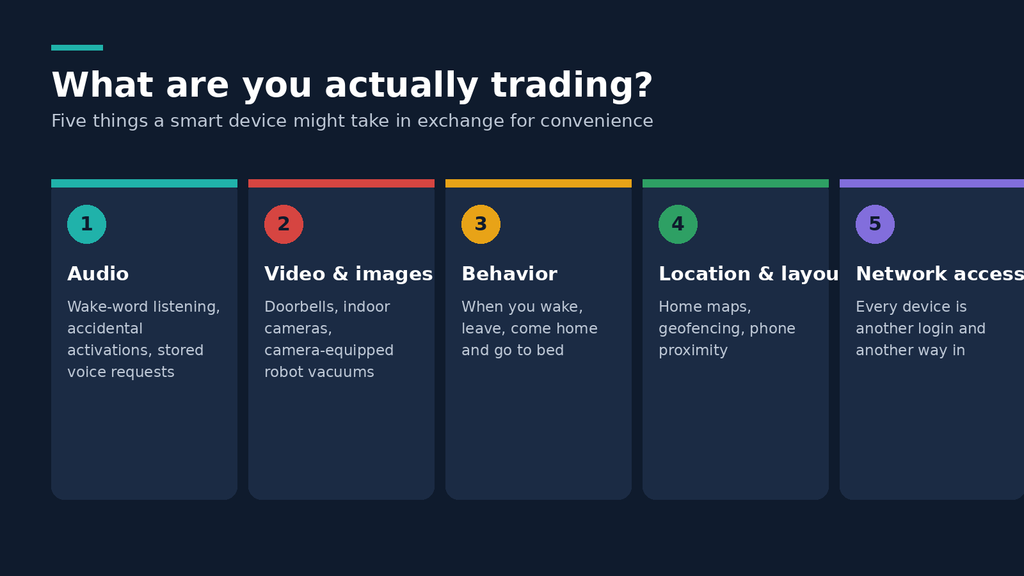
“Privacy” is a vague word, and it helps to break it into specific things a smart device might take from you.
Audio. Smart speakers and displays listen for a wake word. Even when they work as designed, some audio gets sent to the company’s servers, and mistaken activations do happen.
Video and images. Doorbell cameras, indoor cameras, baby monitors, and even some robot vacuums capture images of your home and the people in it.
Behavioral data. Thermostats, lights, locks, and plugs create a timeline of when you’re home, when you wake up, when you leave, and when you go to bed. No single data point is sensitive, but together they describe your life in detail.
Location and spatial data. Robot vacuums build maps of your home. Phone-based geofencing knows when you’re approaching.
Account and network access. Every connected device is another login, another piece of firmware, and another possible way into your home network.
Keep these categories in mind, because the risk differs a lot between them. A smart bulb that learns you turn it on at 7 a.m. sits in a very different place than a camera pointed at your living room.
Three questions to ask before you buy anything
Most of the decision comes down to a few honest questions.
1. What does it need to work, and what does it actually collect?
A smart plug needs to know whether it’s on or off and to receive a command. If the companion app asks for your contacts, precise location, and microphone access, that’s a mismatch worth noticing.
2. Does it work without the cloud?
This is probably the single most useful question. A device that can be controlled locally, over your home network or through a standard like Matter, Thread, Zigbee, or Z-Wave, doesn’t depend on a company’s servers to function. That cuts the amount of data leaving your house and means your device doesn’t stop working when the manufacturer shuts down a service or changes the terms.
3. What happens if this goes wrong?
Imagine the worst realistic outcome: the company gets breached, an employee misuses access, or the product gets discontinued. A leaked list of your lightbulb schedules is an annoyance. Leaked footage from inside your bedroom or your child’s room is a different category of harm.
The low-regret tier: devices that usually earn their place
These categories tend to deliver real benefits while collecting little that’s sensitive, especially if you pick versions that support local control.
Smart plugs and switches
A smart plug turns a regular lamp, fan, or coffee maker into something you can schedule or switch remotely. What it collects is minimal: on/off status, timing, and sometimes energy use. The risk comes mostly from cheap, no-name plugs that require sketchy apps, so stick with established brands or ones that support open standards. If you can get a plug that works through Matter or Zigbee without a vendor cloud account, even better.
Energy monitoring plugs are a quiet win. Seeing what a space heater or old fridge actually costs to run is useful information, and it stays boring data about appliances.
Smart bulbs and lighting
Lighting is about as low-stakes as smart home gets. Schedules, dimming, and color changes make a real difference for sleep routines and convenience. Bulbs that connect through a hub using Zigbee or Thread keep their traffic inside your home. Bulbs that connect straight to Wi-Fi and require a cloud account are fine too, but they add another login and another company holding your usage patterns.
One thing to watch: if your lights are tied to a voice assistant, the lights themselves aren’t the privacy issue. The microphone is.
Smart thermostats
Thermostats collect more than most people expect. Many learn when you’re home and away, which means they hold a pretty good record of your routines. Still, the benefit is concrete: lower energy use through scheduling, the ability to adjust remotely, and better comfort. If you pick a model that lets you turn off occupancy-based learning features or share less data with the manufacturer, you keep most of the benefit and shed some of the exposure. Check the privacy settings in the app, because defaults often favor data collection.
Leak, smoke, and water sensors
Sensors that alert you to a burst pipe, a leak under the sink, or a smoke alarm going off while you’re away might be the best deal in the whole category. A flood can cause thousands of dollars in damage, and the data these sensors collect is trivial: wet or dry, alarm or no alarm. These are easy recommendations.
Contact and motion sensors (used thoughtfully)
Door and window sensors, and motion sensors used for things like turning on a hallway light at night, are low-risk when they run locally. They do create a record of movement, so you’d rather that record live on a hub in your home than on someone else’s server. If you’re using them for security alerts rather than lighting automation, the same logic applies: local processing beats cloud dependence.
The “it depends” tier: real value, real trade-offs
Here, the right call varies by household, and setup matters as much as the product.
Smart speakers and voice assistants
Voice assistants are genuinely handy for timers, music, quick questions, and controlling other devices hands-free. They’re also the device in this guide that most people feel uneasy about, for good reason. A microphone sits in a shared room waiting for a trigger word.
What’s worth knowing:
- Companies have faced regulatory action over voice data handling. In 2023, the U.S. Federal Trade Commission announced a settlement with Amazon over how Alexa handled children’s voice recordings and data retention.
- In March 2025, Amazon announced that Echo devices would stop offering the option to avoid sending voice recordings to the cloud, meaning requests would be processed in the cloud. That change is a good reminder that settings you rely on can disappear.
- Most assistants let you review and delete your voice history, and many offer auto-delete options.
If you want a voice assistant, you can lower the exposure. Place it in a common area rather than a bedroom or home office. Use the physical mute button when you’re having sensitive conversations. Turn on auto-delete for voice history. Review which third-party “skills” or integrations have access. And if you mostly use it for timers and music, ask yourself whether a phone does the same job without adding a new always-on microphone.
Some people choose assistants that process requests on the device or through a self-hosted setup like Home Assistant’s voice tools. Those options take more effort but keep audio inside your house.
Video doorbells
A doorbell camera has an obvious benefit: you see who’s at the door, you catch package thieves, and you get a record if something happens. But a doorbell camera also records your neighbors, passersby, and delivery workers, which raises the stakes beyond your own household.
Cloud-connected doorbells put footage on a company’s servers, and the track record here isn’t spotless. In 2023, the FTC announced a settlement with Ring, alleging that the company had given employees and contractors overly broad access to customers’ videos and had weak security practices. Ring has since made changes, but the episode shows the core problem: once video is stored remotely, you’re trusting people and systems you can’t see.
If you want a doorbell camera, you can reduce exposure in several ways:
- Turn on two-factor authentication and use a unique, strong password.
- Enable end-to-end encryption if the manufacturer offers it, understanding it may disable some features.
- Limit the camera’s field of view and motion zones so it covers your porch, not the whole street.
- Consider models that store footage locally on a card or hub rather than only in the cloud.
- Check how long footage is retained and whether you can delete it.
Doorbell cameras are a reasonable trade for many people, especially for those living somewhere with real package theft or safety concerns. The question is whether you pick a version with strong controls.
Outdoor security cameras
Outdoor cameras pointing at your own driveway or yard are easier to justify than indoor ones. You’re watching a space where you’d expect a security measure, and the sensitive footage is less likely to include your family’s private moments.
Local storage options, like a camera that writes to a microSD card or a network video recorder you own, keep footage under your control. Cloud storage adds convenience (access from anywhere, no hardware to maintain) but concentrates risk. Some cameras support both, so you can pick based on your comfort level.
One caution: a few camera makers have faced scrutiny when “local-only” or “private” marketing didn’t match how the product behaved. In 2022, security researchers reported that Eufy cameras were uploading thumbnails to the cloud in ways that conflicted with the company’s privacy claims. The lesson isn’t that one brand is uniquely bad. It’s that marketing language is not a technical guarantee, and independent reviews matter.
Smart locks
A smart lock offers keyless entry, temporary codes for guests or contractors, and logs of who came and went. For many households, that’s a real quality-of-life improvement. The security trade-offs are different from the privacy ones: a poorly secured lock is a physical risk, not just a data risk.
Look for locks that support a physical key backup, work offline for core functions, and have a track record of security updates. Think carefully about auto-unlock features that use your phone’s location, since they involve constant location sharing. And remember that the access log itself is sensitive: it shows when your home is empty.
Smart TVs and streaming devices
Smart TVs deserve a special mention because they’re easy to forget about. Many use automatic content recognition (ACR), a feature that identifies what’s on your screen so the manufacturer can build viewing profiles and target ads. This isn’t hypothetical. In 2017, Vizio agreed to pay a settlement after regulators alleged it collected viewing data from millions of TVs without adequate disclosure.
The good news is that you can usually switch these features off. Look in the TV’s settings under privacy, terms and policies, or advertising, and disable viewing data collection and personalized ads. It takes ten minutes and costs you almost nothing. If you want to go further, plug the TV into a separate streaming device you trust and keep the TV’s own smart features disconnected from your Wi-Fi.
Smart displays and video-calling devices
Devices with screens and cameras, like smart displays, add a camera to the microphone question. Most include a physical shutter or switch. Use it. If you mostly want a digital photo frame and a kitchen timer, you may find the privacy cost higher than the convenience.
Wearables and health-linked home devices
Smart scales, sleep trackers, and connected health devices can be motivating, and the data can help you notice trends. It’s also some of the most sensitive information you can hand over. Check whether the company shares data with third parties, whether you can export and delete your data, and whether the app works without creating a cloud account. If you can’t find clear answers, that’s information too.
The “think twice” tier: where the trade-off often isn’t worth it
These aren’t automatically bad. But for many households, the cost-benefit math looks weaker.
Indoor cameras in private spaces
A camera inside your home, especially in bedrooms, bathrooms, or a child’s room, creates the highest-stakes footage you can generate. The reasons people buy them are legitimate: checking on a pet, watching a sleeping baby, keeping an eye on an elderly relative. But the consequences of a breach, a misconfigured sharing setting, or a compromised password are severe.
If you decide you need one, take extra care:
- Use a strong, unique password and two-factor authentication.
- Prefer cameras with local storage or end-to-end encryption.
- Turn the camera off or cover the lens when you’re home, using a physical switch or scheduled privacy mode.
- Keep firmware updated.
- Never reuse the default credentials, and don’t expose the camera directly to the internet.
For baby monitoring specifically, a non-internet-connected monitor that uses its own closed signal is a simpler and often safer choice. It does the one job you need without a cloud account.
In some cases, the best trade-off is no indoor camera at all. A door sensor and a motion alert can tell you what you need to know without recording your family.
Robot vacuums with cameras
Robot vacuums can be wonderful, particularly for people with mobility limits or busy schedules. But models with cameras or detailed mapping collect images and layouts of your home. In 2022, MIT Technology Review reported that images taken by development versions of iRobot vacuums, including pictures of people in their homes, had ended up shared among gig workers who were labeling data for AI training. The company said the devices involved were special test units with participants who had agreed to data collection, but the story highlighted how images captured inside homes can travel further than people expect.
If a robot vacuum appeals to you, consider models that navigate with LiDAR or other non-camera sensors rather than cameras, check whether the map is stored locally or in the cloud, and see whether the app allows you to delete maps and cleaning history. You can also restrict no-go zones so the vacuum skips sensitive rooms.
Cheap, no-name devices with mandatory cloud apps
The market is full of inexpensive cameras, plugs, and gadgets from brands you’ve never heard of. The price is tempting, but low-cost devices often come with weak security practices, infrequent updates, and vague privacy policies. Some stop receiving support within a year or two. When the company disappears, so does the app, and you’re left with a device that has known vulnerabilities and no patches.
A useful rule: if you can’t find a clear privacy policy, a support page, and evidence that the company issues security updates, skip the device. Saving a little at checkout isn’t worth it.
“Always listening” gadgets you didn’t ask for
Some products now ship with microphones or AI features that weren’t a big selling point, like certain appliances, toys, and speakers. If a device doesn’t need a microphone to do its job, you shouldn’t have to accept one. Look at what the product listing and the privacy policy say, and be skeptical of features that feel bolted on.
Devices tied to subscriptions that unlock basic function
Some devices keep core features behind a paid plan, especially video storage. That’s not a privacy problem on its own, but it can nudge you toward cloud storage you’d have otherwise avoided. Check what you get without paying before you commit.
How to tell whether a device is trustworthy
You don’t need to be a security expert to do a decent check. A few steps go a long way.
Read the privacy policy, but read it smartly. You don’t have to digest every line. Look for what data is collected, whether it’s shared with third parties or used for advertising, how long it’s kept, and whether you can delete it. Vague language like “we may share data with partners” without specifics is a flag.
Check how long the company supports its devices. A manufacturer that publishes an update policy or a support window is telling you something. One that doesn’t is also telling you something.
Look for independent reviews. Privacy and security researchers regularly test popular devices. Projects like Mozilla’s Privacy Not Included reviews have examined connected products and their data practices. Treat any single review as one input rather than the final word, but patterns across several sources are useful.
Prefer open standards. Devices that support Matter, Thread, Zigbee, or Z-Wave are generally easier to control locally and less dependent on one company’s cloud. Matter in particular is designed so that devices from different brands can work together, and many Matter devices can operate over your local network.
Check whether the app works without sharing everything. If an app demands access to your contacts, microphone, and precise location just to turn on a lamp, close it and look elsewhere.
See how the company has handled past problems. Every company has incidents. What matters is whether they disclosed them, fixed them, and changed their practices. A history of silence or denial is worse than a history of mistakes handled openly.
Setting up your smart home with privacy in mind
Buying well is half of it. The other half is how you configure things.
Put smart devices on their own network
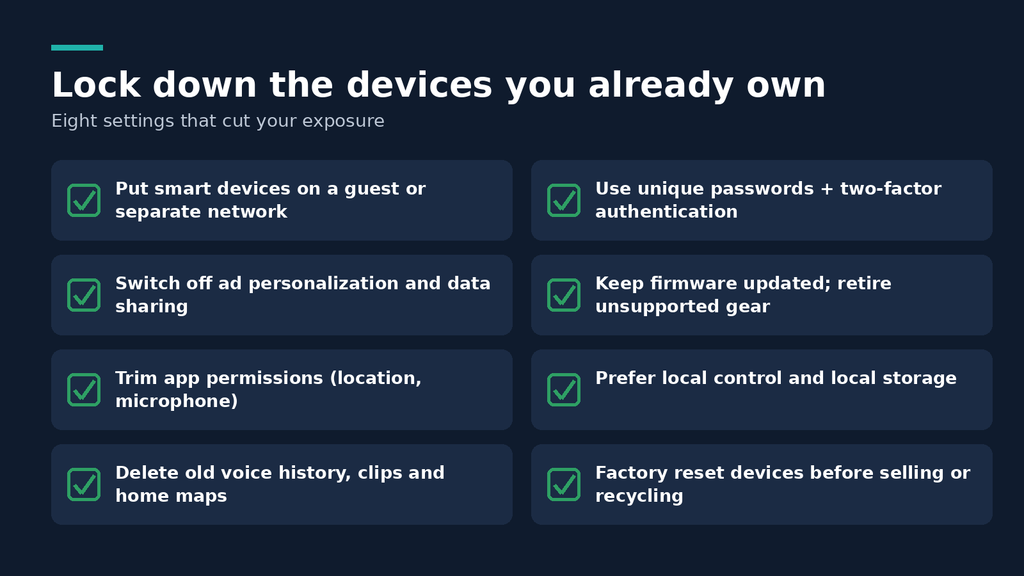
Most routers let you set up a guest network or a separate network segment. Putting your smart devices there keeps them apart from your laptops, phones, and file storage. If one gadget is compromised, it has a harder time reaching the devices that hold your important data. This is one of the highest-value steps you can take, and it doesn’t cost anything.
Use strong, unique passwords and turn on two-factor authentication
Every smart home account should have its own password, ideally generated and stored in a password manager. Credential reuse is how a breach at one company becomes a break-in at another. Two-factor authentication adds a second barrier even if a password leaks. If a device or service doesn’t offer it, weigh that.
Change default settings
Out-of-the-box settings often favor the manufacturer’s data collection. Spend a few minutes in each app’s privacy menu. Turn off personalized ads, data sharing for “product improvement,” voice recording storage, and any feature you don’t use.
Keep firmware updated
Updates fix security holes. Turn on automatic updates where available, and check manually for devices that don’t update on their own. If a device has stopped receiving updates, consider retiring it, particularly if it’s a camera or a lock.
Limit permissions on your phone
Review what the apps are allowed to do. Does the thermostat app need constant background location access, or would “only while using the app” work? Does the vacuum app need your microphone? Restrict whatever you can without breaking functionality.
Use local control when you can
A hub that runs locally, like Home Assistant or a similar platform, can run automations without sending data to a vendor. It takes more effort than plugging in a gadget and using an app, and it won’t suit everyone. But if you’re comfortable with a bit of tinkering, it’s the strongest option for keeping your data at home. Apple Home, Google Home, and Amazon’s ecosystem also have varying degrees of local processing, so check how each one handles your particular devices.
Delete what you don’t need
Voice history, video clips, vacuum maps, old accounts for devices you no longer own: clear them out. Data that no longer exists can’t be leaked, subpoenaed, or sold in an acquisition.
Plan for the end of a device’s life
Before you sell, give away, or throw out a smart device, factory reset it and remove it from your account. Otherwise, the next owner could inherit access, and your data could stay linked to the device.
What about guests, kids, and roommates?
Smart home privacy isn’t only about you. The people who visit or live with you didn’t necessarily agree to be recorded or tracked.
If you have cameras or microphones, tell guests, particularly for indoor devices. In some places, laws govern recording audio or video, and expectations differ for places like bedrooms and bathrooms. A simple heads-up respects people and avoids awkward situations.
For families with children, think about what data you’re creating about them. Smart speakers, connected toys, and kids’ tablets may collect voice recordings or usage patterns, and children can’t meaningfully consent. Use parental controls, review the settings, and prefer devices with clear policies about children’s data.
If you rent or share a home, talk with roommates or your landlord about what’s installed and who has access. Shared accounts and old tenant logins are a surprisingly common source of unwanted access.
A simple framework for deciding
When you’re weighing a purchase, run through this short list:
- Is there a real problem this solves? Convenience counts, but “it seemed cool” is a weak reason to introduce a new data collector into your home.
- How sensitive is the data it collects? Water sensors and plugs sit at one end. Indoor cameras and microphones sit at the other.
- Can it work locally? If yes, the risk drops a lot.
- Can I limit or delete what it collects? If you can’t, that matters.
- Do I trust this company to behave well and to keep supporting the product? Look at track record, not just promises.
- What’s the worst realistic outcome, and could I live with it? If the answer is no, find a different approach.
If a device scores well on most of these, it’s probably a fair trade. If it fails on several, walk away or look for a better alternative.
So what’s actually worth it?
Here’s the short version of everything above.
Usually worth it: smart plugs and switches, smart bulbs, leak and smoke sensors, door and window sensors, and thermostats with sensible privacy settings. These deliver clear benefits with limited exposure, especially when they support local control.
Worth it with careful setup: outdoor cameras, video doorbells, smart locks, smart speakers, and smart TVs. The value is real, but your configuration choices decide whether the trade-off is reasonable. Use strong authentication, turn off unnecessary data collection, and favor local storage and processing.
Think twice: indoor cameras in private spaces, camera-equipped robot vacuums, cheap no-name devices with mandatory cloud apps, and gadgets that add microphones without a clear reason. In many homes, the benefit doesn’t outweigh the potential harm, or a lower-risk alternative does the same job.
No setup is risk-free, and you don’t need a perfect one. What you want is a home where the devices you’ve chosen earn their place, where you know what each one collects, and where you’ve made deliberate choices rather than accepting whatever the defaults handed you.
Frequently asked questions
Are smart home devices safe?
They can be reasonably safe when you choose reputable products, keep them updated, use strong and unique passwords, and put them on a separate network. The risk varies by device type and manufacturer. Devices that handle video, audio, or access to your home deserve more scrutiny than lightbulbs or plugs.
Do smart speakers record everything you say?
Smart speakers are designed to listen for a wake word and then send your request to the company’s servers. They don’t continuously stream everything to the cloud under normal operation, but accidental activations happen, and recorded requests may be stored. You can review and delete your voice history in most companion apps and use the mute button when you want the microphone off.
Can smart home devices be hacked?
Yes. Weak passwords, unpatched firmware, and poorly designed devices can all be exploited. Using unique passwords, two-factor authentication, automatic updates, and a separate network for smart devices lowers the risk substantially.
What is the most private way to run a smart home?
Local control is generally the most private approach. A hub that runs automations inside your home, combined with devices that use standards like Zigbee, Z-Wave, Thread, or Matter, reduces how much data leaves your house. Platforms like Home Assistant are popular for this purpose, though they require more setup than mainstream voice assistant ecosystems.
Is it safe to put a camera inside my house?
It depends on the camera, how it’s configured, and where it’s placed. Indoor cameras capture highly sensitive footage, so use strong authentication, prefer local or end-to-end encrypted storage, keep firmware updated, and avoid placing cameras in bedrooms or bathrooms. Many people decide that sensors and alerts are a lower-risk alternative.
Should I turn off the microphone on my smart devices?
If you don’t use voice features, turning the microphone off is a sensible choice. If you do use them, consider muting the device during private conversations and placing it in a shared area rather than a bedroom.
How can I stop my smart TV from tracking me?
Open the TV’s settings and look for options related to viewing data, automatic content recognition, personalized advertising, or interest-based ads. Turn those off. For a stronger approach, use an external streaming device you trust and keep the TV’s built-in smart features disconnected from the internet.
What should I do with smart devices I no longer use?
Factory reset them, remove them from your accounts, and delete any stored data, such as video clips or maps. If a device no longer receives security updates, retire it rather than leaving it connected to your network.
Does Matter improve smart home privacy?
Matter is a connectivity standard designed to help devices from different brands work together, and it supports local communication on your home network. That can reduce reliance on individual manufacturers’ clouds. It doesn’t guarantee privacy on its own, since each device and app still has its own data practices, but it gives you more options to keep control inside your home.
The bottom line
Smart home technology isn’t something you have to accept or reject as a whole. The better approach is to treat each device as its own decision. Ask what it does for you, what it takes in return, and whether you can limit that exchange. A leak sensor and a bedroom camera are not the same kind of choice, and treating them the same way leads to either needless fear or careless trust.
Start with the low-regret devices, set them up properly, and add anything more sensitive slowly and deliberately. Review your settings now and then, retire gear that’s no longer supported, and stay a little skeptical of marketing that promises privacy without showing how. A smart home can be convenient and still be yours.