Most people don’t think much before typing into a chatbot. You paste in an email draft, ask about a rash, describe a fight with your landlord, or upload a spreadsheet and ask for a summary. It feels like talking to a private assistant. It isn’t quite that.
So, is your data safe when you use AI chatbots? The honest answer is: it depends on which chatbot, which plan, which settings, and what you’re typing. Some of the risk is overblown. Some of it is real and gets less attention than it should. This guide covers where your conversations go, who can access them, what has gone wrong in the past, and what you can do to keep sensitive information out of the wrong hands.
The short answer
For everyday, low-stakes questions, such as recipe ideas, grammar fixes, or explaining a concept, using a mainstream chatbot is generally reasonable. The companies behind the big products have security teams, encryption in transit, and published privacy policies.
But “reasonably secure” isn’t the same as “private.” A chatbot conversation is not like a note on your own device. Your text is sent to a company’s servers, usually stored for some period, sometimes reviewed by humans, and in some cases used to improve the product. Whether that matters depends on what you share.
A useful rule: don’t type anything into a chatbot that you wouldn’t be comfortable having stored on a company’s server. Everything below is about helping you apply that rule sensibly.
What happens to your message after you hit send
It helps to follow the path your text takes.
When you send a message, it travels over an encrypted connection to the provider’s servers. There, the model processes it and generates a reply. That part usually happens in seconds. What happens next is where privacy gets complicated.
Storage. Most chatbots save your conversation history so you can come back to it later. That history lives on the company’s servers, tied to your account. Even if you delete a chat from your sidebar, copies may be retained for a limited period for safety, abuse monitoring, or legal reasons. The exact window varies by company and by plan, so check the current policy rather than assuming deletion is instant and total.
Human review. Many providers say that a small portion of conversations may be reviewed by trained staff or contractors, typically to catch abuse, investigate safety problems, or improve model quality. This is usually described in privacy policies, though most people never read that far. If you’ve typed something deeply personal, assume that a human could, in some circumstances, see it.
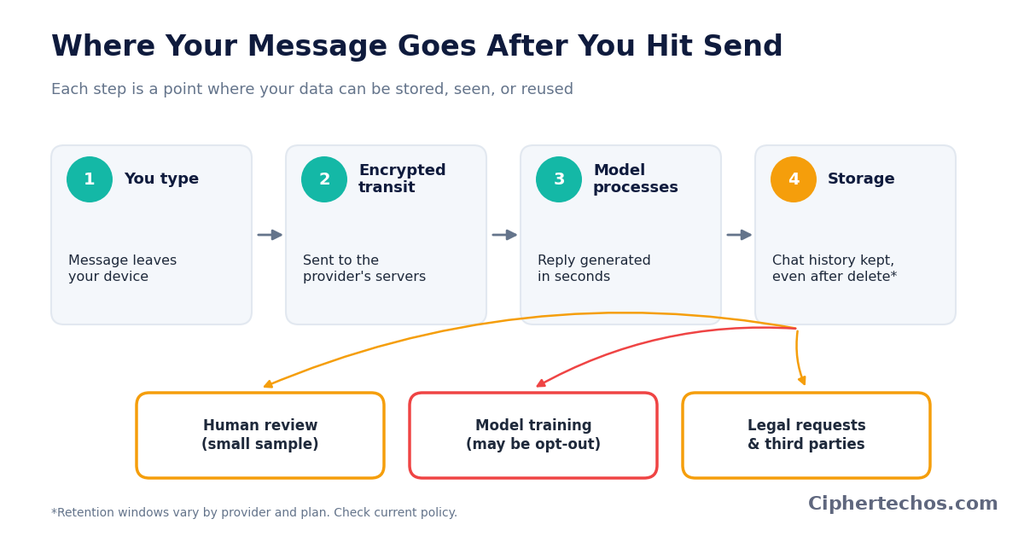
Training. This is the one people worry about most. Some services use consumer conversations to train or fine-tune future models, either by default or unless you opt out. Others don’t by default, or offer a clear toggle. Business and enterprise products often promise the opposite: that your data won’t be used for training. Policies in this area have changed repeatedly across the industry, so treat anything you read (including here) as a starting point and check the provider’s current settings page.
Third parties. Providers may share data with service vendors that help run their infrastructure, and with authorities when legally required. If you use a chatbot that’s built into another app, such as a customer service widget, a browser extension, or a writing tool, your text may pass through that company as well as the underlying AI provider. That’s two sets of policies, not one.
Does “training on your data” mean the AI will repeat your secrets?
This is one of the most common fears, and it deserves a careful answer rather than a scary one or a dismissive one.
Language models learn patterns from large amounts of text. They don’t work like a database that stores your messages and retrieves them on request. If your conversation were used in training, it would be one tiny contribution among an enormous amount of material, and the model isn’t designed to hand your text back to another user on demand.
That said, “unlikely” isn’t “impossible.” Researchers have shown that language models can sometimes memorize and reproduce pieces of their training data, especially text that appears repeatedly or has distinctive formatting. A well-known line of academic work demonstrated extraction of memorized text from earlier models. Providers have since added safeguards, but the underlying lesson holds: if sensitive information goes into a training set, you lose control over where it might surface.
So the practical risk from training isn’t that a stranger will ask the bot “what did Sarah type yesterday?” It’s that you’ve handed over information you can no longer fully take back, in a system whose behavior can’t be perfectly predicted. For things like passwords, API keys, or medical identifiers, that’s reason enough to keep them out.
Real incidents worth knowing about
Abstract warnings are easy to ignore. A few documented incidents show how things actually go wrong.
Employees pasting in confidential material. In 2023, news outlets reported that engineers at Samsung had entered internal source code and meeting notes into ChatGPT while trying to get help with work tasks. The company reportedly responded by restricting the use of generative AI tools on its systems. Nobody hacked anything. People simply pasted in material they shouldn’t have, which is the most common failure mode by far.
Bugs on the provider’s side. In March 2023, OpenAI disclosed a bug in an open-source library that caused some users to see the titles of other users’ conversations, and in a smaller number of cases exposed limited payment-related information for some subscribers. The company took the service offline briefly and fixed the issue. It’s a reminder that these are software products, and software has bugs.
Regulatory action. Italy’s data protection authority temporarily blocked ChatGPT in 2023 over concerns about the legal basis for data collection and age verification, and later fined OpenAI €15 million in December 2024 over privacy-related findings. OpenAI has disputed aspects of that decision. Whatever you think of the outcome, it shows that regulators in Europe are paying close attention to how chatbots handle personal data.
Shared links showing up in search. In 2025, reports emerged that some shared chatbot conversations had been indexed by search engines, making chats that people had shared via a link discoverable by anyone searching. The feature that allowed discoverability was removed after the backlash. The lesson: when you click “share,” you’re creating a web page, and you should treat it like one.
Court orders and legal discovery. Chat logs can become evidence. In litigation involving AI companies, courts have at times ordered providers to preserve user conversation data that would otherwise be deleted. If you wouldn’t want something produced in a legal proceeding, think twice before typing it.
None of these incidents mean chatbots are uniquely dangerous. They mean the risk is mostly about human behavior, product settings, and legal reality, not about movie-style hacking.
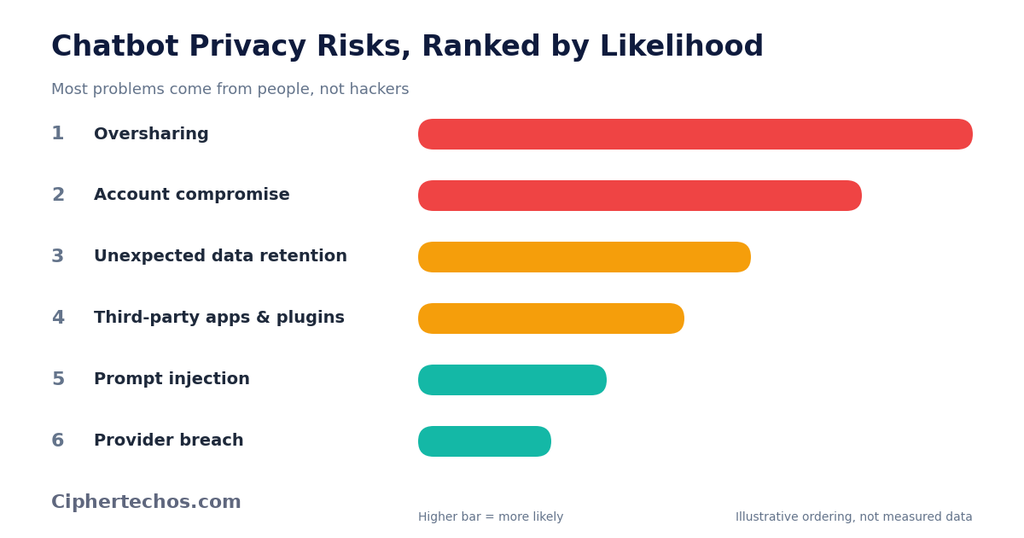
The biggest risks, ranked by how likely they are
Not every threat deserves equal worry. Here’s a more realistic ordering.
By a wide margin, this is the most likely way your data ends up somewhere you didn’t intend. People paste in client contracts, employee records, unreleased product details, financial statements, and medical history because it’s convenient and the chat window feels casual.
Chatbots invite this kind of candor. They respond warmly, they don’t judge, and they’re available at 2 a.m. That’s part of what makes them useful, and it’s also why people say things to them that they’d never post online.
2. Your account gets compromised
If someone gets into your chatbot account, they get your entire history. People reuse weak passwords, skip two-factor authentication, and stay logged in on shared computers. A chat history can contain a surprising amount of personal information, since it’s effectively a running diary of your questions, worries, and work.
3. Data retention you didn’t know about
Many people assume that closing a chat or deleting it makes the content vanish. Retention rules vary, and some data may be kept for safety or legal purposes. If you’ve been treating a chatbot as a disposable scratchpad, you may have more stored than you realize.
4. Third-party apps and plugins
Chatbots increasingly connect to other tools: email, calendars, cloud storage, browsers, and a growing ecosystem of plugins and integrations. Each connection widens the amount of data the system can touch. An integration with a sloppy privacy policy or weak security can become the weak link, even if the main provider is careful.
5. Prompt injection and manipulated content
This one is more technical but increasingly relevant. Prompt injection is when hidden or malicious instructions are placed inside content a chatbot reads, such as a web page, a document, or an email. If the chatbot has access to your data or can take actions on your behalf, a manipulated input might trick it into revealing information or doing something you didn’t ask for. Security researchers, including the OWASP community, list prompt injection among the top risks for applications built on language models.
If you use a chatbot that can browse the web, read your files, or send messages for you, be more cautious than you would with one that just answers questions.
6. Provider breaches
A direct hack of a major AI provider is possible, as it is with any large online service. It’s lower on this list because it’s less common than user error, but it’s the reason you shouldn’t treat any cloud service as a vault.
What kinds of information you should never put in a chatbot
Some categories are risky enough that a firm “no” is the safer default.
- Passwords, recovery codes, and API keys. If you need help debugging code, remove credentials first. Developers accidentally paste keys into chats more often than they’d like to admit.
- Government ID numbers. Social Security numbers, passport numbers, national ID numbers, and driver’s license details have no business in a chat window.
- Full financial account details. Card numbers, bank account numbers, and login information should stay out.
- Other people’s private information. Names, addresses, health details, or HR matters belonging to coworkers, clients, patients, or family members. Even if you’re comfortable sharing your own data, you don’t have the right to hand over theirs.
- Confidential business material. Unreleased financials, trade secrets, proprietary code, client contracts, and anything covered by an NDA. Check your employer’s policy first. Many companies now have one.
- Detailed medical records. General health questions are one thing. Pasting in a full chart with your name, date of birth, and diagnosis is another. In many countries, health data gets special legal protection precisely because it’s so sensitive.
- Anything you’d be seriously harmed by if it leaked. That’s a simple gut check, and it works.
If you’re a professional bound by confidentiality, such as a lawyer, doctor, therapist, accountant, or journalist, the stakes are higher. Using a consumer chatbot with client or patient information can breach professional or legal obligations, regardless of how good the provider’s security is.
How different types of chatbot accounts compare
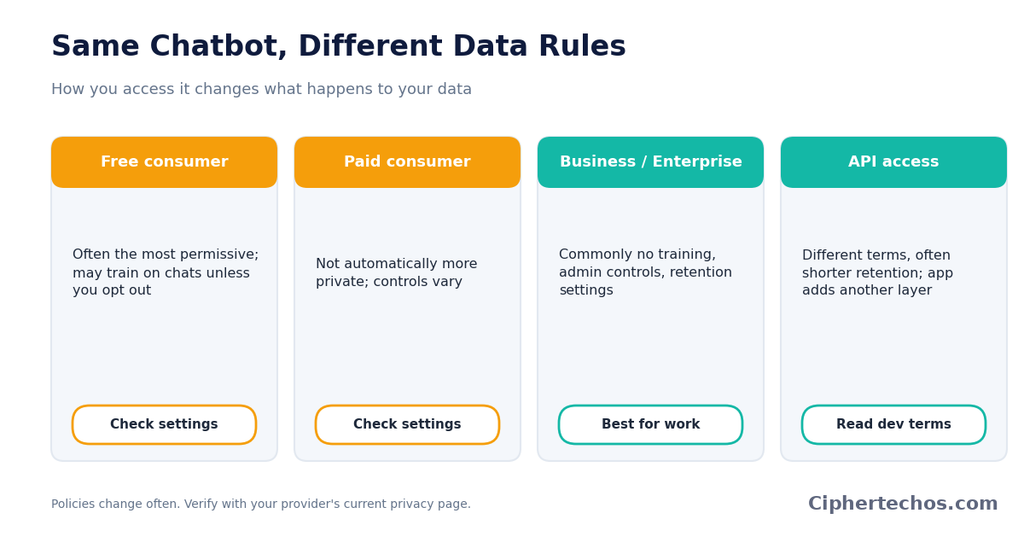
Not all chatbot access is equal. Broadly, you’ll run into four setups, and the privacy picture differs among them.
Free consumer accounts. These typically come with the most permissive data handling. Providers often reserve the right to use conversations to improve their products unless you opt out. If you’re not paying, assume your data is part of the value exchange, and read the settings.
Paid consumer subscriptions. Paying doesn’t automatically mean more privacy. Some paid plans offer the same training defaults as free ones, while others give you clearer controls. Check the settings instead of assuming.
Business, team, and enterprise plans. These are generally built for organizations, and providers commonly promise that business data won’t be used to train their models, along with admin controls, retention settings, and sometimes compliance certifications. If you’re using AI for work, this is the tier you should be on, not a personal account.
API access. Developers building on a provider’s API usually get different data terms than consumers using the chat app, often with shorter retention and no training on the data by default. But policies differ by provider, and the developer’s own app adds another layer of data handling.
The point isn’t that one tier is safe and another is not. It’s that the same chatbot can have very different data practices depending on how you access it. If privacy matters to you, find out which category you’re in.
Privacy features worth looking for
Most major chatbots now offer some mix of the following. Availability varies, so look in your account settings.
A training opt-out. A toggle that stops your conversations from being used to train models. If you care about privacy, turn it off in the sense of opting out, and check that the setting applies to your account type.
Temporary or incognito chats. Some services let you start a conversation that isn’t saved to your history and isn’t used for training. These usually still get retained briefly for safety purposes, so they’re better described as “less stored” than “never stored.”
Chat history controls. The ability to delete individual conversations, wipe your history, or turn history off entirely.
Data export and deletion requests. If you’re in a region with strong privacy law, such as the EU under the GDPR or California under its privacy statutes, you may have legal rights to access, correct, or delete your personal data. Providers generally have a process for this.
Two-factor authentication. Not strictly a chatbot feature, but one of the most effective protections you have. Turn it on.
Memory controls. Some chatbots now remember details across conversations. That can be convenient, but it also means more of your personal information is being retained. Look for ways to view, edit, or switch off that memory.
A practical way to protect yourself
You don’t need to stop using chatbots. A few habits cover most of the risk.
Strip out identifying details before you paste. If you want feedback on a contract, replace names, addresses, and amounts with placeholders like “Client A” or “[amount].” You’ll usually get nearly the same quality of help without exposing the real details. This single habit prevents most privacy mishaps.
Describe the situation instead of uploading the document. Rather than pasting a full medical report, say “I’m a 40-year-old with these symptoms and this lab result.” You can often get what you need from a summary.
Use your work’s approved tools for work tasks. If your company provides an enterprise AI account, use it. Don’t paste work material into a personal account to save time. If your company hasn’t set a policy, ask before assuming it’s fine.
Read the settings once. Spend ten minutes in your account’s privacy and data controls. Decide on training, history, and memory. Most people never look, and the defaults aren’t always what they’d choose.
Turn on two-factor authentication. If someone gets into your account, they get your chat history. Make that harder.
Be careful with sharing links. Before you share a conversation publicly, reread it. Assume anyone with the link, and possibly search engines, can see it.
Think before connecting other apps. Every integration, whether email, files, or calendar, gives the chatbot more reach. Connect only what you actually need, and review permissions occasionally.
Don’t treat it as a confidant for emergencies. If you’re dealing with a legal threat, a medical emergency, or something where confidentiality really matters, a chatbot isn’t a substitute for a professional bound by privilege and professional duty. A conversation with a lawyer is generally protected by attorney-client privilege. A conversation with a chatbot generally isn’t.
Use local or self-hosted models for the most sensitive work. If you handle truly sensitive material regularly, running an open-source model on your own hardware keeps the text on your own machine. It takes more technical effort and the models may be less capable, but it removes the third-party storage question entirely.
Special situations
Using AI chatbots for health questions
People ask chatbots health questions constantly, and for general information it can be helpful. The privacy issue is about what you attach to the question. “What causes recurring headaches?” is low-risk. “Here’s my full medical history, name, and insurance number, what do I have?” isn’t.
Also remember that in many places, the privacy laws that protect your health information, like HIPAA in the United States, apply to healthcare providers and certain related organizations. They don’t automatically cover whatever you type into a consumer chatbot. That gap surprises many people.
Using AI chatbots at work
This is where most real-world damage happens. Employees under time pressure grab whatever tool is fastest. If you’re in a company, find out what’s allowed. Many organizations restrict what can be entered into public AI tools, and violating those rules can be a firing offense, not just a privacy slip.
If you run a team or business, write a short, plain-language AI policy. Specify which tools are approved, what data categories are off limits, and who to ask when in doubt. Banning AI entirely tends to push people toward using it secretly on personal accounts, which is worse.
Using AI chatbots with children
Children’s data is typically subject to extra legal protection, and age requirements for AI services vary. If a child in your household uses a chatbot, check the service’s age rules, supervise what they share, and talk to them about not entering their full name, school, address, or photos. Kids often treat a chatbot like a friend and may overshare in ways they wouldn’t with a stranger.
Using AI chatbots for therapy-like conversations
Plenty of people use chatbots to talk through feelings. That’s understandable, since it’s private-feeling, free, and always available. Just keep in mind that these conversations are stored on a company’s servers and aren’t covered by the confidentiality that governs a licensed therapist’s practice. If you share deeply personal details, you should know where they’re going.
Are the companies behind chatbots trustworthy?
It’s tempting to ask for a simple verdict, and there isn’t one. The major providers publish privacy policies, many have security certifications, and several have made real changes after criticism. At the same time, they’re commercial companies with incentives to collect data, they operate in an area where laws are still catching up, and policies shift over time.
A more useful question than “can I trust them?” is “what do I need to rely on them for?” You can reasonably trust a major provider to run a competent security operation. You can’t reasonably expect a promise of total privacy from a service that stores your text, may review it, and is subject to legal demands. Those are different things.
It also helps to separate the company’s intentions from its capabilities. A company might sincerely want to protect your data and still suffer a bug, a breach, or a court order that forces it to retain records. Protecting yourself means not depending on perfect behavior from anyone.
How to read a chatbot privacy policy without losing your mind
Privacy policies are long, and almost nobody reads them. You don’t have to read every word. Look for answers to these questions:
- Is my content used to train models? And can I opt out?
- How long is my data kept, and what happens when I delete a chat?
- Can people review my conversations, and under what circumstances?
- Who is my data shared with, besides the provider?
- Where is my data stored, and which laws apply?
- What rights do I have to access or delete my data?
- Does the policy differ for business or API use?
Many providers also publish a shorter FAQ or a “data controls” page that answers these more plainly than the full legal document. Start there.
What to expect going forward
Regulation is catching up. The EU’s AI Act is being phased in, and data protection regulators across multiple countries are examining how chatbots collect and use personal data. Expect more rules about transparency, consent, and children’s data over time, along with more enforcement.
Meanwhile, companies are rolling out more privacy controls, enterprise-focused offerings, and options that process data on your own device. These are good developments, but features and promises change quickly. The habit that will hold up over time is simple: understand what a tool does with your data now, check again periodically, and don’t enter anything you couldn’t live with becoming exposed.
Frequently asked questions
Do AI chatbots read my conversations?
Automated systems process them, obviously, since that’s how the chatbot responds. Human review is typically limited to a subset of conversations, for reasons like safety, abuse prevention, or quality improvement, but policies differ. Check your provider’s terms.
Can I delete my chat history permanently?
You can usually delete conversations from your account, and many providers have a process for requesting data deletion. But retention periods, backups, and legal obligations mean deletion may not be instant or absolute. Read the specifics for your provider.
Is it safe to enter my name or email address?
Occasional, low-stakes use is generally low risk, but there’s rarely a reason to include identifying details when you can leave them out. Less data shared means less to worry about.
Are paid chatbots more private than free ones?
Not automatically. Business and enterprise tiers often come with stronger commitments, but a personal paid subscription may have the same data practices as the free plan. Look at the settings and terms for your specific plan.
Is incognito or temporary chat mode really private?
It reduces what’s stored and usually keeps the conversation out of your history and out of training, but providers may still retain data briefly for safety and legal reasons. It’s better than nothing, not a guarantee.
Can a chatbot leak my information to another user?
It’s uncommon, but not impossible. Bugs have caused users to see other people’s conversation titles before. Model memorization is another, more theoretical route. Keep truly sensitive information out of any chat to avoid the question.
Should I stop using AI chatbots altogether?
For most people, no. They’re useful tools, and the risks are manageable with sensible habits. The goal is to use them with your eyes open: share less, check your settings, and keep sensitive material out.
What’s the single most important thing I can do?
Be deliberate about what you type. Most data problems with chatbots come from people sharing things they shouldn’t, not from sophisticated attacks.
Final Takeaway
Is your data safe when you use AI chatbots? Reasonably safe for ordinary questions, not safe enough for your most sensitive information, and heavily dependent on the choices you make.
The tools aren’t inherently reckless, and the companies behind them aren’t all villains. But a chatbot is a cloud service. What you type leaves your device, gets stored, may be seen by people or systems you can’t see, and can be subject to bugs, breaches, and legal demands. Treat it with the same care you’d give any online service that holds personal information.
Take ten minutes to review your privacy settings, turn on two-factor authentication, get in the habit of stripping out names and numbers before you paste, and keep passwords, IDs, and confidential material out of the conversation entirely. Do that, and you can get most of the benefit of these tools with a lot less of the risk.