
You’ve found the laptop you want, and there are two listings side by side. One is new and costs what it costs. The other is the same model, “refurbished,” and sits noticeably lower. Somewhere between the price tag and the checkout button, a small voice asks what’s wrong with it, why it was returned, and whether you’re about to trade a good deal for a headache.
That hesitation is fair, but it’s aimed at the wrong question. “Refurbished versus new” matters less than “who refurbished it, what do they promise, and for how long?” A refurbished MacBook sold and warrantied by Apple is a different purchase from one sold by an anonymous seller with a 30-day return window, even though both carry the same label. Get that part right and buying refurbished is often a smart move. Get it wrong and you can end up with a tired battery, a dead pixel, or a device nobody will service.
This guide covers what the terms mean, where the savings come from, which categories are good candidates and which aren’t, where to buy, how to inspect a device the day it arrives, and when you should just pay for new.
The Short Answer
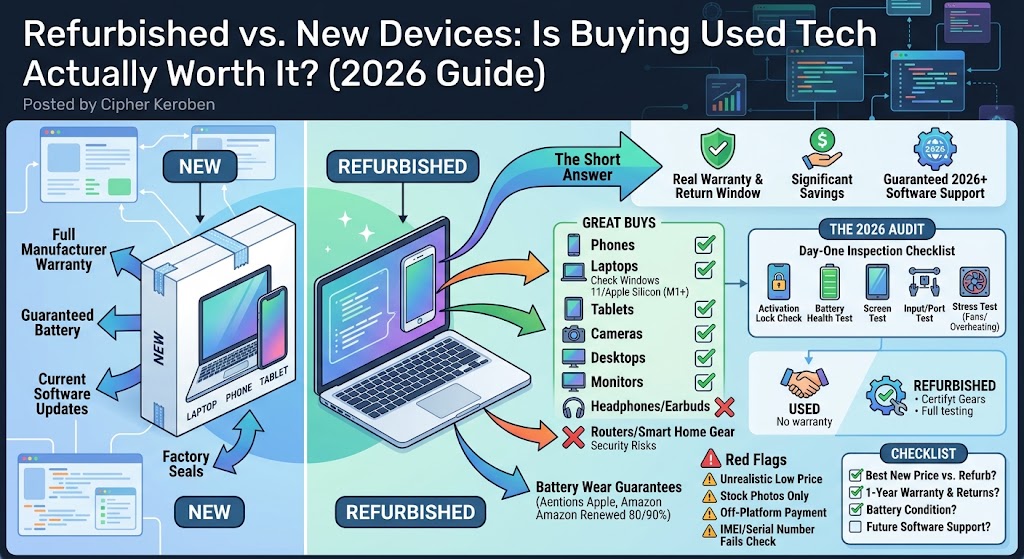
Refurbished is usually worth it for phones, laptops, tablets, and similar devices when three things are true. The seller offers a real warranty and a real return window, the savings are big enough to matter, and the device will keep getting software updates for as long as you plan to use it. Take away any one of those and the math changes fast.
It’s usually not worth it for things with tiny batteries that sit in your ears, for gear that depends on security patches you can’t verify (routers, some smart home devices), or when the discount is small enough that a sale on the new version beats it.
The rest of this post is about telling which side of that line your purchase falls on.
What “Refurbished” Actually Means
Retailers use these words loosely, and the differences matter more than the marketing suggests.
Used
Used means sold as-is, usually by an individual. Nobody has tested it professionally, nobody stands behind it, and there’s typically no warranty. Facebook Marketplace, Craigslist, and most peer-to-peer listings live here. A used device can be a great deal, but you’re the inspector, the warranty department, and the risk manager all at once.
Refurbished
Refurbished means the device has been professionally inspected, repaired if needed, cleaned, and certified before resale. A refurbished device comes with a warranty, while used devices typically don’t. That’s the practical dividing line.
Certified refurbished
This usually means the manufacturer did the work itself, as in Apple’s certified refurbished store or the outlet programs run by Dell, Lenovo, Microsoft, Samsung, and other big brands. It’s generally the highest-trust tier, because the company that built the device is putting its own warranty behind it.
Open-box
Open-box usually means someone bought it, returned it, and the retailer resold it. Often it’s barely used, sometimes never even powered on, and occasionally it has a story. Policies vary a lot between stores, so read the fine print on warranty and returns.
Renewed
“Renewed” is simply Amazon’s brand name for refurbished. Amazon sorts these products into condition tiers rather than treating them all alike, which we’ll get to below.
What the grades really tell you
You’ll see labels like Excellent, Good, or Fair on refurbished listings. These grades are usually cosmetic descriptions only. A “Fair” device with a scuffed aluminum edge can perform identically to an “Excellent” one. Read the grade as a statement about scratches, then look separately at the battery guarantee and warranty terms.
Where the Savings Come From
People tend to assume refurbished means half price. Sometimes it does, but the size of the discount depends on who’s selling and how old the product is.
Manufacturer programs offer modest discounts, because you’re paying for the certification and warranty. Apple advertises savings of up to 15%, alongside a one-year warranty and full functional testing. That’s real money on a big purchase, but it isn’t a dramatic markdown, which is why Apple’s refurbished store can feel underwhelming at first glance. The value there is less about the price cut and more about getting near-new hardware with genuine manufacturer backing.
Third-party refurbishers and marketplaces are where deeper discounts tend to live. They can undercut manufacturers because they buy in bulk from lease returns, trade-ins, and liquidation lots, and their warranties and standards vary. The bigger the discount, the more carefully you want to read what’s promised.
Timing matters
New devices don’t show up refurbished right away. One refurb-price tracker measured a median of 82 days after release for an iPhone, 99 days for a MacBook Air, and 115 days for an iPad. That’s one company’s tracking rather than an official Apple figure, but it matches the general pattern: the freshest hardware is the last to appear and the least discounted.
Your real competitor isn’t launch-day pricing
Most people miss this one. The true rival to a refurbished device is often the new price during a sale, or last year’s model brand new once the successor arrives. A refurbished 2024 laptop that’s 20% below its original price looks a lot less impressive next to a new 2024 laptop a retailer is clearing out at 25% off. Always check the best new price before deciding the refurb is a bargain.
What You’re Really Trading
Buying refurbished is a trade. You accept a bit more uncertainty in exchange for a lower price, and the goal is to keep that uncertainty small and cheap to fix.
Battery wear
Every lithium-ion battery loses capacity as it’s charged and discharged, and a device that spent a year in someone else’s hands has already done some of that. This is the main hidden cost in refurbished phones, laptops, and tablets, and how a seller handles it tells you a lot.
Apple replaces the battery on certified refurbished iPhones and iPads: its refurbished iOS devices come with a new battery and outer shell. Macs are different. Refurbished Macs get genuine Apple replacement parts as needed, not an automatic new battery and casing, so a refurbished MacBook may have a used battery. Third-party sellers set their own rules. Amazon tests Renewed batteries to at least 80% of new capacity, or at least 90% for Renewed Premium products.
Cosmetic wear
Scratches, dents, and faint marks are common on lower grades. If your laptop lives in a sleeve and you care mostly about performance, a cosmetically imperfect one is a good trade. If a scuff would bug you every time you open the lid, pay for the top grade.
Shorter or weaker warranties
A new device typically carries a one-year manufacturer warranty. The best refurbished programs match that, and weaker ones offer 90 days or less. Warranty length is one of the clearest signals of how confident a seller is in their own work.
Missing extras
Refurbished items from third parties may arrive in plain packaging with generic accessories. Amazon’s own Renewed page says products may come in a generic box with generic accessories, and that refurbished phones aren’t guaranteed to keep their waterproof seal. That second point matters if you bought a phone partly for its water resistance. Once a phone has been opened and reassembled, don’t count on it surviving a dunk.
Software support running out
This is the sneakiest one, and it gets its own section further down, because it can turn a good deal into a bad one in two years.
Category by Category: What’s Worth Buying Refurbished?
Not all tech ages the same way. Here’s how I’d think about the common categories.
Smartphones
Phones lose value fast, which makes refurbished phones some of the best deals in tech. A phone one or two generations old is usually 90% as capable as the current flagship for everyday use, and refurbished pricing on those models can be very attractive.
Check three things: battery health, carrier compatibility, and update support. On an iPhone, you can see maximum capacity under Settings > Battery > Battery Health & Charging. Apple has said its recent iPhones are designed to retain up to 80% of original capacity after a set number of charge cycles (a higher number for newer models than older ones), so a reading well above 80% is a good sign, and one near or below it means a battery replacement is coming soon.
Make sure the phone is unlocked, or locked to your own carrier. Buying one that’s still tied to a different carrier is a classic way to end up with an expensive paperweight. Also confirm the phone isn’t blacklisted as lost or stolen. Many countries offer IMEI-check tools for this, and reputable refurbishers screen for it, but private sellers might not.
Certified programs are the safest route. A refurbished iPhone from Apple gets a new battery and shell plus the standard one-year warranty. Third-party refurbishers usually grade for cosmetics and guarantee a minimum battery percentage, which varies by seller.
Laptops
Laptops are a strong refurbished category, especially business-class models. Lease returns from corporate fleets, like ThinkPads, Dell Latitudes, and HP EliteBooks, arrive in large numbers, are built to last, and are often well maintained. If you don’t mind a slightly older design, a refurbished business laptop can give you much better build quality than a new consumer laptop at the same price.
Check the keyboard (every key), the hinge (no wobble or cracks), the screen (dead pixels, uneven backlight, yellow tint), the ports, the battery, and the fans (loud or rattling ones point to wear). Confirm the storage and memory too. It’s easy to overpay for a refurbished laptop with a small drive or 8GB of RAM that you’ll want to upgrade right away.
Macs: buy the configuration you’ll want in three years, not the one that feels cheapest today, because memory and storage are soldered and can’t be changed later. Since refurbished Macs don’t automatically get a new battery, check the health and cycle count and budget for a replacement if the numbers are high.
Windows laptops: confirm the machine can run Windows 11. Regular support for Windows 10 ended in October 2025, so a laptop that can’t upgrade is a security liability. Windows 11 generally needs a relatively recent processor (roughly 8th-generation Intel or AMD Ryzen 2000 series and newer) plus a TPM 2.0 chip. Older, cheap refurbished laptops that miss those requirements are a false economy.
Tablets
Tablets tend to be lightly used and hold up well, and they don’t have hinges or keyboards to wear out. Battery health and screen condition are your main checks. Apple’s refurbished iPads come with a new battery and outer shell under its published terms, which makes them a very safe pick.
Headphones and earbuds
This is where I’d usually say buy new. Earbuds have tiny batteries that degrade quickly, and there’s a hygiene factor with anything that goes in your ears. Over-ear headphones are a more reasonable refurbished purchase, since the battery is bigger and the pads are replaceable, but check that the seller will take them back if battery life disappoints. Apple does refurbish AirPods, and buying those directly from Apple is the one case where I’d feel comfortable with earbuds.
Cameras and lenses
The used camera market is mature and well policed, with dedicated dealers who grade condition carefully. Cameras age slowly compared with phones, and lenses can last decades. For camera bodies, ask about the shutter count, which is the number of photos taken and a rough proxy for wear. For lenses, look for haze, fungus, dust, and scratches on the glass, and test autofocus. Buy from a specialist dealer with a return policy rather than a random listing.
Game consoles
Consoles are usually fine refurbished if the seller tests the disc drive, ports, and controllers. Controllers wear out with stick drift and worn buttons, so a console that arrives with a tired controller may mean buying a new one immediately.
Desktops, monitors, and components
Refurbished desktops and monitors are often excellent value because they have no batteries and fewer wear points. Check monitors for dead pixels, backlight bleed, and burn-in on OLED models. Be cautious with heavily used graphics cards from unknown sources, since a card that ran flat out in a mining rig for months may have less life left than its price implies. A seller with a real warranty is the mitigation.
Routers and smart-home gear
I’d generally buy these new. Their value depends on security updates from the manufacturer, and a refurbished unit may be a model near the end of its support window. An unpatched router is a bigger risk than a slow one.
Where You Buy Matters More Than What You Buy
The same physical device can be a great deal or a bad one depending on the seller. Here’s how the main options stack up, from most protective to least.
1. The manufacturer’s own refurbished store
Apple, Dell, Lenovo, Microsoft, Samsung, and other big brands run outlet programs. You get the manufacturer’s testing, parts, and warranty. Apple’s is the best known: devices arrive with all accessories and cables in a brand new white box, with free shipping and returns, and you can add AppleCare coverage. If you’re buying from a non-Apple seller, check whether the device qualifies for AppleCare before you pay, because some buyers report being turned away when they try to add it later. The trade-off is that discounts are modest.
2. Specialist refurbished marketplaces
Back Market is the best-known example. Sellers on these platforms are vetted, and grading and battery standards are published. Third-party comparisons report that every iPhone sold on Back Market comes with a minimum 12-month warranty, and one puts the battery floor at 85%. Those figures come from outside reviewers, not from the platform itself, so confirm the actual terms on the listing you’re looking at. Quality can still vary between individual sellers on the same platform, so check ratings and reviews.
3. Amazon Renewed
Amazon’s program is broad and convenient, and its terms are reasonably clear. In the US, a Premium device must have over 90% battery health and comes with a 365-day return window, while standard Renewed items need over 80% battery health with a 90-day return period. Some items work differently: select Renewed items include a 30-day return period followed by a free 11-month limited warranty serviced by Asurion. The product page states which applies, so read it rather than assuming. Seller quality varies more here than on specialist platforms, so stick to Premium listings or highly rated sellers for expensive purchases.
4. Big-box open-box and refurbished sections
Best Buy, Walmart, and similar stores sell open-box and refurbished items, often with their normal return policies. The upside is being able to return something to a physical store. The downside is inconsistent standards, since “open-box” can mean anything from a never-used display model to a device that came back for a real problem.
5. Peer-to-peer marketplaces
Facebook Marketplace, Craigslist, and eBay private sellers. Prices can be the lowest here, but there’s no warranty, no professional testing, and often no recourse. Only buy this way if you can inspect the item in person, test everything, and verify that it isn’t locked to someone else’s account.
A useful rule: the lower the tier, the bigger the discount needs to be to justify it.
How to Compare Warranties and Return Policies
Two numbers matter most: the return window and the warranty length. They protect against different problems.
The return window is your safety net for problems you find in the first days, like a bad screen, a battery that doesn’t hold up, or a device that just doesn’t feel right. You want enough time to test thoroughly, ideally 30 days or more. A shorter window means you need to do all your testing immediately.
The warranty covers defects that appear later, like a motherboard failure at month six. A year is the standard and a good marker of a serious seller. Look at what’s excluded: many warranties skip accidental damage, water damage, and third-party repairs.
One more detail on returns. Amazon says you must back up your data, unlink cloud accounts, and factory reset the device before returning it, or it may not qualify for a refund or replacement. Most sellers have something similar, so don’t ship back a device that’s still signed in to your account.
For the highest peace of mind, look for a return window of 30 days or longer paired with a warranty of at least a year. If a listing offers only a couple of weeks and no warranty, it should be priced like a used device, not a refurbished one.
The Day-One Inspection Checklist
The return window only helps if you use it. Treat the first 48 hours as an audit.
Check what you got
Compare the listing to the box: model, storage, memory, color, and included accessories. Check the serial number against the manufacturer’s coverage lookup, where one exists, to confirm the model and warranty status.
Look for account locks
Do this before anything else. On an iPhone, iPad, or Mac, make sure you can set it up as new without being asked for someone else’s Apple ID. A device stuck on Activation Lock is unusable and must go back immediately. On Android, check that a factory reset doesn’t demand a previous Google account. On a laptop that used to belong to a company, look for management profiles and firmware passwords that could block you from installing an operating system.
Check battery health
On an iPhone, look under Settings > Battery > Battery Health & Charging. On a Mac, open System Settings > Battery for the health status, and find the cycle count in System Information under Power. On a Windows laptop, open Command Prompt and run powercfg /batteryreport to generate a report comparing design capacity with actual full-charge capacity. On Android, readouts vary by brand; Samsung’s diagnostics in its Members app can report battery status, for example. Compare what you find with what the seller promised.
Test the screen
Display solid white, black, red, green, and blue in turn and look for dead or stuck pixels, uneven brightness, discoloration, and burn-in. Test touch across the whole screen, including the edges.
Test every input and output
Type on every key. Try the trackpad, including clicks in the corners. Plug something into every port, and confirm charging works on each USB-C port that should support it. Play audio through the speakers and record with the microphones. Test the front and rear cameras, including autofocus and flash. Try Face ID, Touch ID, or fingerprint unlock if the device has them.
Test wireless connections
Connect to Wi-Fi and Bluetooth. On a phone, insert your SIM or set up your eSIM to confirm calls, texts, and data all work.
Stress it a little
Run something demanding for 15 to 20 minutes, like a video export, a game, or a benchmark, and watch for overheating, crashes, or fans that scream. Hardware faults often show up under load, not while idle.
Check the software
Confirm the operating system is current and that you can install updates. Check that the storage and memory match the listing.
Then decide
If anything is wrong, contact the seller and start the return while you’re safely inside the window. A good seller will handle it without a fight.
A refurbished device that can’t get updates is a ticking clock. You might not notice until a security patch stops arriving or an app refuses to install, so check before you buy.
Apple devices. Apple doesn’t publish a fixed support period for iPhones, iPads, or Macs, but it has historically kept them updated for many years. The trap is Intel Macs: Apple has said macOS Tahoe is the last release that will run on them, so an Intel Mac bought refurbished today will eventually stop getting new versions. Check Apple’s compatibility list for the model you’re considering.
Windows laptops. The key question is whether the machine can run Windows 11, as covered above. A refurbished laptop stuck on Windows 10 is past the end of regular security updates.
Android phones. Support windows vary widely by brand and model. Recent flagships from Google and Samsung have promised as many as seven years of updates, but budget models and older devices often get far less. Look up the specific model’s update policy and its last patch date before buying.
The simplest habit: subtract the device’s age from its support window and see how many good years you’re actually buying. A phone with three years of updates left can still be a great deal if you upgrade often. Bought as a device you’ll keep for five years, it’s a bad one.
Red Flags That Should Make You Walk Away
Some warning signs are worth taking seriously no matter how good the price looks.
- The price is far below every other listing for the same model and condition. Stolen, locked, and counterfeit devices circulate on price alone.
- The seller dodges questions about battery health, warranty, or return terms.
- The photos are stock images instead of the actual item, or the description is vague about condition.
- The seller won’t accept returns, or the return window is only a few days.
- The listing says something like “used but working” with no mention of testing or grading.
- You’re asked to pay outside the platform, by wire transfer, gift card, or any method that removes buyer protection.
- The IMEI or serial number is blocked, missing, or fails the manufacturer’s lookup.

Any one of these is reason enough to look elsewhere. There will always be another listing.
When New Is the Smarter Buy
Refurbished isn’t always the answer, and pretending otherwise would be dishonest. Here’s when I’d pay for new.
The discount is small. If a refurbished device saves you only a little, a shorter warranty and a used battery aren’t worth it. This happens most with the newest models, which haven’t been refurbished for long and haven’t dropped much in price.
You’ll keep it for many years. If you plan to use a device for six or seven years, the longest possible software support window matters, and new hardware gives you the most of it.
You need the latest features. If you depend on something only the newest generation offers, like a specific camera improvement, a new chip capability, or a newer wireless standard, older refurbished stock can’t deliver it.
A failure would cost you. If a dead device would cost you money or time, such as a work laptop you can’t afford to lose, a full new warranty with service coverage gives more peace of mind, though a well-covered refurbished unit is also a reasonable choice.
A sale beats the refurb price. Check current promotions, previous-generation clearance, and trade-in credits before deciding. Sometimes new simply wins on price.
It’s hard to sanitize or evaluate. Earbuds and some accessories fall into this bucket.
A Simple Way to Decide
When you’re stuck between two listings, run through these questions in order.
- What’s the best new price right now, including sales and previous-generation options? This is your true baseline. If the refurbished price isn’t meaningfully lower, stop here.
- Who’s standing behind the device, and for how long? Prefer manufacturer programs or reputable specialist sellers, with at least a 30-day return window and a one-year warranty.
- What’s the battery situation? You want either a guaranteed minimum percentage or a brand-new battery. A worn battery on an older device is a repair bill waiting to happen.
- How long will it keep getting updates, and how long do I plan to keep it? Make sure the support window covers your plan with room to spare.
- Can I live with the cosmetic grade? If not, pay for the higher grade or go new.
- Will I actually test it in the first two days? If you know you won’t, the return window can’t protect you, and buying from the safest seller matters even more.
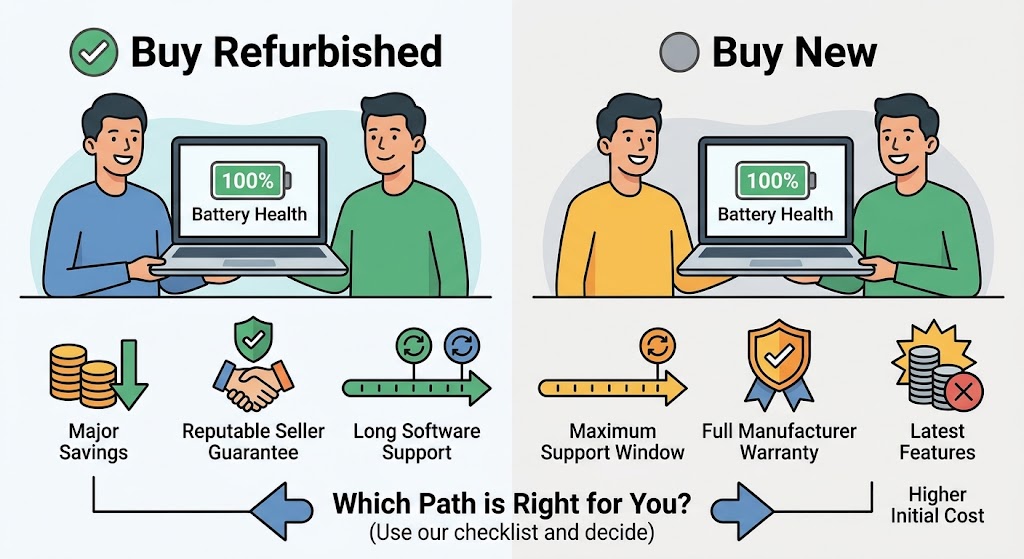
If you can answer those confidently and the numbers still favor refurbished, you’re making a good call.
The Environment and Your Data
Two smaller points deserve a mention.
On the environment: making a new electronic device takes a lot of resources, so keeping an existing one in use longer is generally better for the planet than manufacturing a replacement. Apple itself notes that refurbished products help lower overall environmental impact. That’s a side benefit rather than a reason to buy something you don’t need, but it’s a real one.
On your data: a properly refurbished device should already have been wiped and had its operating system reinstalled. Still, set it up as new, install updates right away, and avoid restoring from any backup you don’t recognize. And when you eventually sell or return a device yourself, back up your data, sign out of every account, turn off tracking features like Find My, and run a full factory reset, so the next person isn’t inheriting your accounts.
Conclusion
Buying refurbished tech is worth it more often than most people expect, as long as you shop by seller and terms instead of by label. A manufacturer-certified iPhone, iPad, or laptop with a fresh battery, a year of warranty, and a proper return window gives you nearly everything a new device does for less money. A well-graded device from a reputable specialist can save even more, provided you check the battery guarantee and the return policy.
Trouble starts when the discount is the only thing convincing you. A cheap price attached to a short return window, a vague grade, no battery promise, and a device about to lose software support isn’t a deal. It’s a gamble with better odds for the seller.
So do the boring parts. Compare against the best new price, read the warranty and return terms, check how long updates will last, and spend the first two days testing everything. If it all lines up, buy the refurbished one and keep the difference. If something feels off, walk away and buy new. That’s a perfectly good decision too.